![logolimanobkg-1.png]](https://help.easyllama.com/hs-fs/hubfs/logolimanobkg-1.png?height=40&name=logolimanobkg-1.png)
Before You Start
What You'll Need
- Learner email address associated with your EasyLlama account
- Access to email for login link delivery
- Internet connection and web browser
- For SSO: Microsoft or Google company email credentials configured by your organization
Quick Reference
- Primary URL:
l.easyllama.com("L" as in Learner) - Alternative URL:
easyllama.com> Login > Learners - Login methods: Email link delivery or Single Sign-On (SSO)
- DNS fix: Use
https://dashboard.easyllama.com/learner_sign_inif redirects fail
Email-Based Login
Step 1: Navigate to learner portal
Go to l.easyllama.com in your web browser.
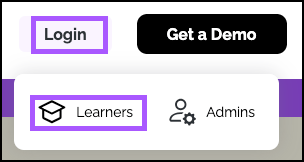
Alternatively, visit easyllama.com, click Login, then select Learners.
Step 2: Enter email and complete security check
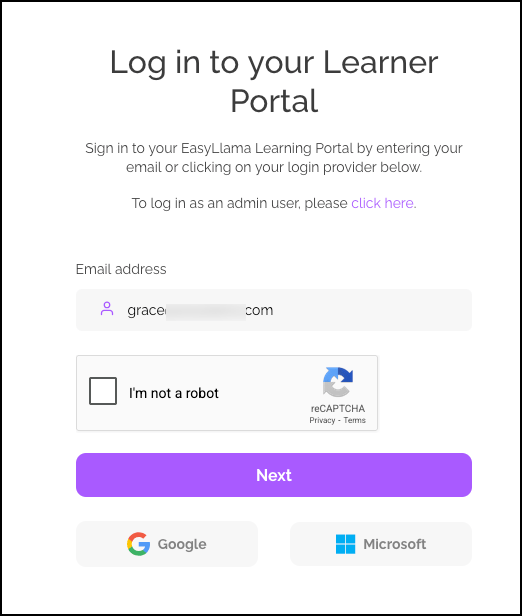
- Enter your work email address associated with EasyLlama
- Complete the reCAPTCHA security verification
- Click Next to proceed
Step 3: Check email and access portal
- Check your email inbox for a message from EasyLlama
- Click the secure login link in the email
- You are redirected directly to the Learner Portal
NOTE: The email link is time-sensitive for security. Use it promptly after receiving.
Single Sign-On (SSO) Login
Step 1: Access login page
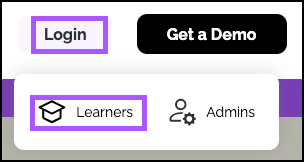
Go to l.easyllama.com or **easyllama.com > Login > Learners**.
Step 2: Use SSO option
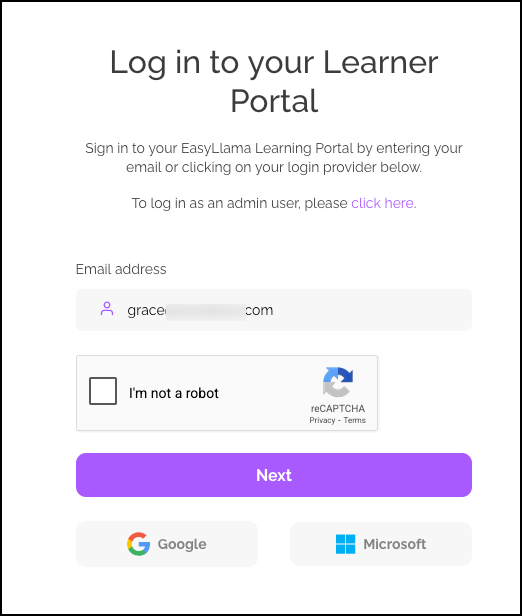
If your organization uses Microsoft or Google for company emails:
- Click the corresponding button (Microsoft or Google)
- Enter your company SSO credentials when prompted
- You'll be redirected directly to your Learner Portal
Troubleshooting Access Issues
DNS redirect errors
If you experience DNS errors with l.easyllama.com:
- Use the direct link: **https://dashboard.easyllama.com/learner_sign_in**
- This bypasses potential redirect issues
- Provides the same login experience
Email delivery problems
If the login email doesn't arrive:
- Check spam/junk folders
- Verify the email address matches the one in your EasyLlama learner profile
- Ensure email filters aren't blocking EasyLlama messages
- Contact the organization's admin if issues persist
SSO configuration requirements
For Microsoft/Google SSO to work:
- Your organization must have SSO configured with EasyLlama
- You must use your company email address associated with the SSO setup
- Contact your admin if SSO isn't working
Learner Portal Features
Available without assigned courses
You can access the portal anytime to:
- View available courses (if any are assigned)
- Re-watch completed courses for refresher training
- Download certificates for completed training
- Access documents & policies requiring signature
- Submit anonymous reports through the reporting tool
- Manage your learning preferences
Self-service capabilities
- Independent access without needing admin notifications
- Track your progress on current assignments
- Access your certificate repository for completed training
- Review organizational policies in the document library
Helpful Tips
Know your email address
You must use the exact email address associated with your EasyLlama learner profile—typically your work email.
Check spam folders if the login email doesn't arrive
Login emails may be filtered as spam. Always check spam/junk folders if the email doesn't arrive in your inbox.
Quick Questions
Can I access the portal without any assigned courses?
Yes! The portal is always accessible regardless of current course assignments for certificate access, document review, and other features.
What if my email isn't recognized?
Contact your organization's EasyLlama admin to verify the correct email is on file in your learner profile.
Is the login link reusable?
No. Each login link is single-use and time-limited for security. Request a new link each time you need to access the portal.
Can I use my mobile device?
Yes. The learner portal is mobile-responsive and works on smartphones and tablets through web browsers.
What if I forgot my password?
There's no password to remember—you'll receive a new login link via email each time you access the portal.
Llama Fact: Llamas are independent yet know how to access their herd's resources when needed—similar to how learners can independently access their training portal for organizational learning resources!