![logolimanobkg-1.png]](https://help.easyllama.com/hs-fs/hubfs/logolimanobkg-1.png?height=40&name=logolimanobkg-1.png)
Sometimes the wrong course is assigned, or we need to unassign a course for a variety of reasons.
Before You Start
What You'll Need
- Administrative access to the dashboard
- Identification of learners with incorrect course assignments
- Understanding of completion percentage thresholds (50% or less for removal)
- Knowledge of seat age rules (under 12 months for recovery)
- Access to Learners tab
Quick Reference
- Individual actions: Update or remove courses from learner profiles
- Bulk actions: Unassign multiple learners with course selection options
- Seat recovery: Courses under 12 months old return to your balance
- Completion limit: Courses over 50% completion cannot be removed (contact support by clicking Help > Contact Us in the EasyLlama Dashboard.)
Individual Course Management
Step 1: Access the learner profile
- Log in to the Dashboard.
- From the left navigation menu, click Learners.
- Use the search or filters to locate the desired Learner.
- Click the Learner’s Name to open their training profile.
Step 2: Review current assignments
In the Current Assignments section, see all assigned courses with completion percentages.
Step 3: Update or remove a course
Option A: Replace a course (under 50% completion)
- Click the three dots (⋮) next to the course.
- Select Update.
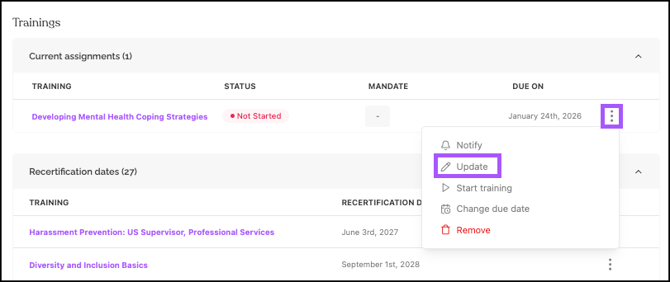
- Choose the correct replacement course from the list.
- Confirm the change
Option B: Remove a course (under 50% completion)
- Click the three dots (⋮) next to the course
- Select Remove (only appears if course is under 50% complete)
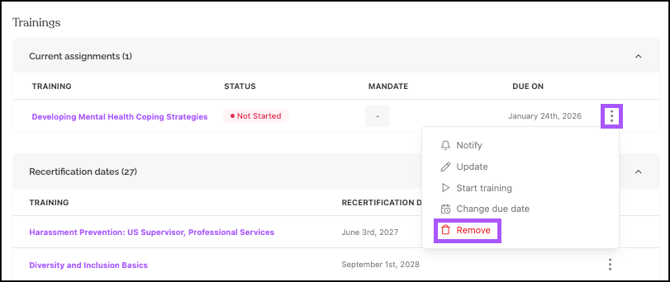
- Confirm in the pop-up dialog to unassign the course.
Step 4: Seat recovery consideration
If course seat is under 12 months old: Seat automatically returns to the balance
If course seat is over 12 months old: Seat is expired and not recovered
Method 2: Bulk Course Management
Step 1: Select learners for bulk action
- Check boxes next to learner names
- Purple action bar appears with selection count
- Note: Can only select learners on current page (50 per page)
Step 2: Bulk unassign courses
-
In the purple action bar, click More > Unassign Trainings.
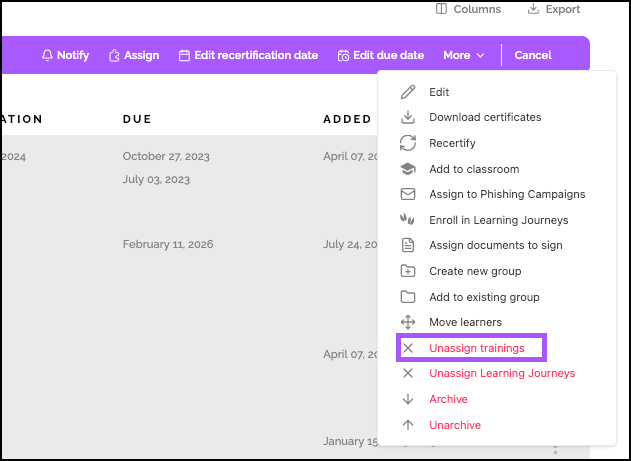
-
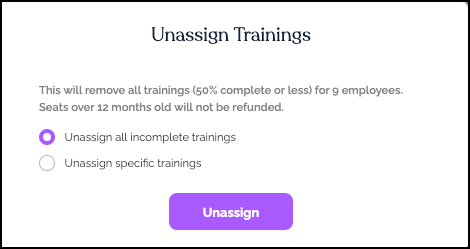
In pop-up, choose:
- Unassign all incomplete trainings to remove all trainings from the selected learners
- Unassign specific trainings to select which trainings to remove
-
Click Unassign.
Step 3: Bulk assign replacement courses (optional)
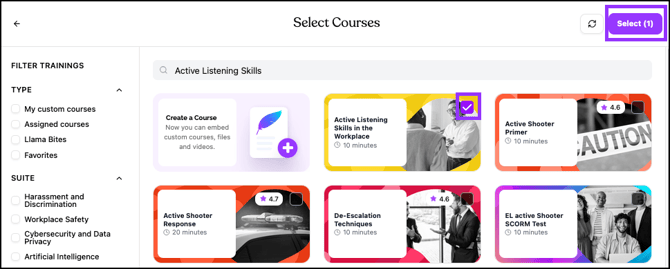
- With learners still selected, click Assign in purple action bar
- Search for, and click the course(s) to assign.
- Click Select (X) to assign the replacement course(s).
Step 4: Bulk notify learners (if needed)
- Reselect learners (selections clear after assignments)
- Click Notify in purple action bar
- Configure notification preferences - either Now, or At a specific date and time.
- Click Send.
Important Information
Completion percentage rules
- Under 50% completion: Can be removed or replaced
- Over 50% completion: Cannot be removed
- Completed courses: Cannot be removed, replaced, or transferred
Seat recovery rules
- Under 12 months old: Seat returns to balance upon removal
- Over 12 months old: Seat is expired, not recovered
- Multiple seats: Each seat age considered independently
Bulk operation constraints
- Page limits: 50 learners per page for selection
- Course selection: Can choose specific courses or "all courses"
- Notification separation: Assign and notify are separate bulk actions
Helpful Tips
Courses over 50% complete cannot be removed
The removal limit is 50% (previously 10%). Courses over 50% require support intervention for removal.
Seats over a year old will not return to your balance
Only seats under 12 months old return to your balance. Older seats are permanently consumed.
Check course completion before replacement
Always check completion percentage before attempting removal or replacement.
Quick Questions
What if a course is over 50% complete?
Reach out to support by clicking Help > Contact Us in the EasyLlama Dashboard. Self-service removal is only available for courses under 50% completion.
Can I transfer a completed course to another learner?
No. Completed courses cannot be moved, transferred, or reassigned to other learners.
How do I know if a seat will be recovered?
Check the original assignment date. Seats under 12 months old recover; seats over 12 months do not.
Can I bulk update (replace) courses?
Currently, bulk operations only support unassigning and assigning. Individual updates must be done through learner profiles.
Llama Fact: Llamas are careful about their steps and correct missteps promptly—similar to how this feature helps you correct course assignment missteps before they become training completion issues!