![logolimanobkg-1.png]](https://help.easyllama.com/hs-fs/hubfs/logolimanobkg-1.png?height=40&name=logolimanobkg-1.png)
Before You Start
What You'll Need
- Administrative access to the EasyLlama dashboard
- Permission to view billing information
- Access to Settings > Billing
Check Subscription Details
Step 1: Navigate to billing settings
- Log in to the Dashboard.
- From the left navigation menu, click Settings > Billing.
Step 2: Access subscription details
On the Billing page, locate the Current Plan tile.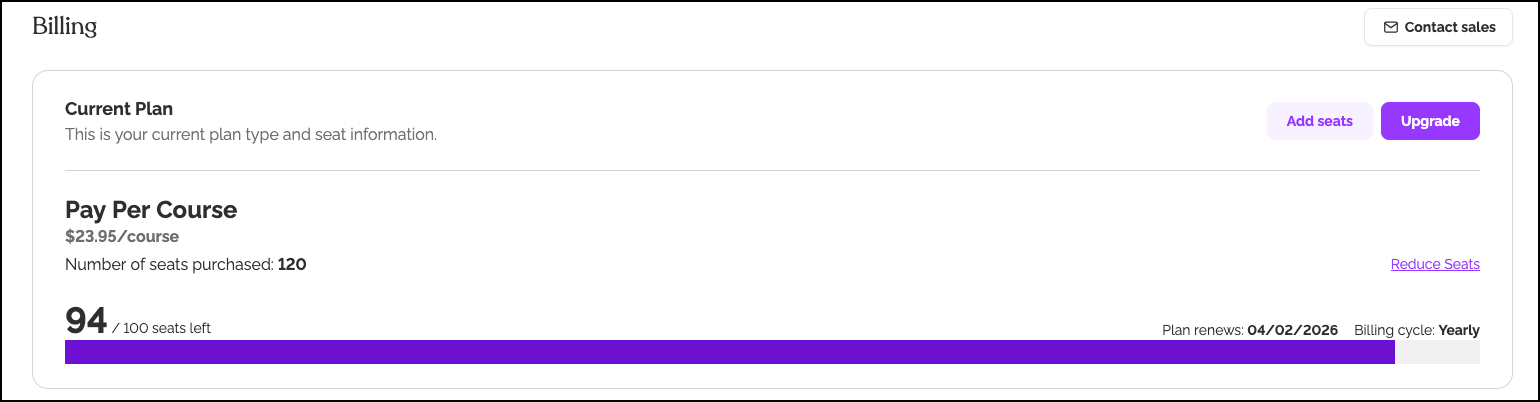
Step 3: Review subscription information
These key details appear:
- Number of Seats Purchased: Number of available training seats in your balance
- Seats left: The number of seats used
- Plan Renews: The date the plan renews
- Billing Cycle: How often the plan renews
If needed, you may also add or reduce seats or upgrade to a different plan.
Quick Questions
How often does the available seat count update?
Seat availability updates as courses are assigned (upon using the seat.)
When do my seats expire?
Seats expire one year after they are purchased.
What if I need more seats before my renewal date?
You can purchase additional seats at any time through your billing settings. See: How to Purchase Additional Seats.
Llama Fact: Llamas are mindful of their resources and track them carefully—similar to how you should monitor your training seat balance to ensure you have resources when needed!