![logolimanobkg-1.png]](https://help.easyllama.com/hs-fs/hubfs/logolimanobkg-1.png?height=40&name=logolimanobkg-1.png)
Overview
Compliance Advisor helps you identify what compliance training requirements apply to your organization and why. Answer a short questionnaire about your organization, including your industry, size, employee locations, and how your business operates, and Compliance Advisor maps your profile against a lawyer-curated and verified database of 800+ federal, state, and local training mandates.
The result is a compliance program tailored to your organization, showing the applicable training requirements, the laws behind them, who needs to take each training, and the potential consequences of non-compliance.
Compliance Advisor continuously monitors for changes to help keep your compliance program current as requirements evolve. Each mandate traces back to a specific legal source, so you can understand not only what applies, but why.
Important: Compliance Advisor isn't legal advice. It maps your organization's information to the regulations maintained in EasyLlama's compliance database and provides a starting point for building your compliance training program. Consult your own legal counsel for legal determinations specific to your organization.
Want to see how Compliance Advisor works in your EasyLlama Admin dashboard?
Take the interactive walkthrough to see how Compliance Advisor builds a personalized compliance program, from setting up your Compliance Profile to reviewing the training requirements that apply to your organization.
👉 Compliance Advisor Product Tour
Set a Training's Recertification Frequency
Step 1: Set Up Your Compliance Profile
- Open Compliance Advisor and start your Compliance Profile.
- Confirm your primary industry, any additional industries, company size, and annual revenue.
- Review your employee locations. These are pulled automatically from your learner records and can't be edited here, but you can add any extra regions your organization operates in that aren't already listed.
Note: Your organization details stay in sync with your account Settings automatically, so your profile and account stay aligned.
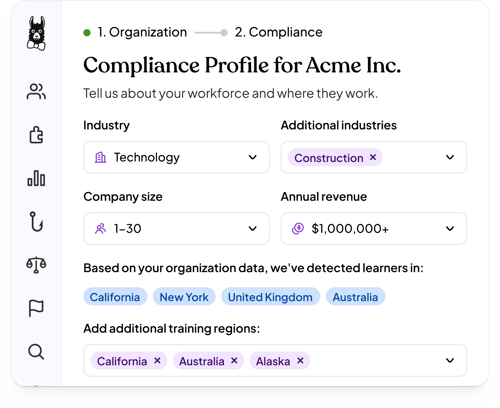
Important: The more complete and accurate your learner data, including roles, titles, and work locations, the more accurately Compliance Advisor can determine which requirements and learners apply.
Step 2: Answer the Compliance Questions
- Answer the questions about how your business operates. They're grouped by the jurisdiction of the law behind them, with federal questions first.
- Answer each question Yes, No, or Unsure. Your progress saves automatically, and each group shows how many questions you've answered.
- Click See Your Program once you're done.
Tip: Compliance Advisor suggests high-confidence answers based on your organization profile, with a short explanation of why. If no suggestion appears, answer the question yourself. Suggestions never overwrite your answers, and you can re-run them at any time.
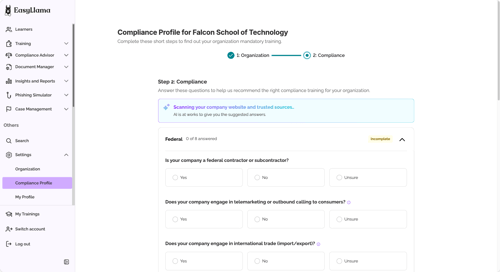
Note: If you move on with questions still blank, you'll see a confirmation prompt. Continuing fills the gaps with the AI recommendation, defaulting to Yes where no recommendation exists.
Important: Building your compliance program doesn't assign any training to anyone. Nothing is assigned at this stage, and nothing is assigned until you confirm assignments yourself in a later step.
Step 3: Review Your Compliance Program
After you complete your Compliance Profile, Compliance Advisor shows the training requirements that apply based on your organization's information and answers.
Click Tell me more on any training to open the Who's included breakdown. This shows who the mandate covers, including employees by location, managers whose direct reports are in a covered location, and any role inclusions or exclusions.
.png?width=500&height=272&name=EasyLlama%20(4).png)
Step 4: Review Your Executive Summary
At the top of your program, the Executive Summary gives you a high-level view of your compliance program, including training, learners, regions, and industries.
The Last reviewed stamp shows when EasyLlama's compliance team most recently verified the mandates in your program. Expand the table to review each training requirement alongside its related laws, jurisdictions, and potential consequences of non-compliance.
.png?width=550&height=297&name=EasyLlama%20(1).png)
Coming soon: A plain-language, AI-written summary of what's driving your program and what may need attention, along with an Export program option to turn your Executive Summary into a shareable PDF for executives and team leads who don't have an EasyLlama login.
Step 5: Assign Training to Your Learners
Each training card shows how many learners still need the training. That count only includes learners who don't already have an open assignment and aren't already certified and current, so it reflects who still needs to be assigned.
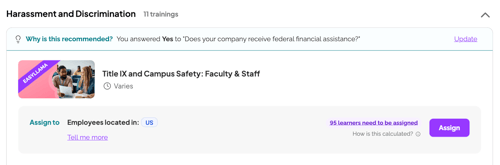
Coming soon: A tooltip breaking down that count and a Suggested Learners list showing who's recommended for each training. Once available, clicking through will pre-populate the assignment modal with the recommended learners, and you'll be able to add or remove learners before confirming.
Nothing is assigned until you confirm.
Once training is assigned, EasyLlama can help automate the ongoing admin with notifications, reminders, and recertifications to keep training on track.
Frequently Asked Questions
What if a mandated course isn't in EasyLlama's library yet?
The requirement still appears in your compliance program. If the related course is Coming soon or Planned, you'll see a Notify Me option so you can be emailed when it becomes available.
If a course isn't currently coming soon or planned, you'll see a Request Course option instead. EasyLlama's content team tracks these requests to help inform future course development.
Either way, you'll receive a confirmation email when you submit your request or notification preference and another email when the course becomes available.
Do I need to upgrade my plan to use Compliance Advisor?
No. Compliance Advisor is available to all EasyLlama customers across current and legacy plans. Every customer can build a personalized compliance program based on their organization's requirements.
Whether you can assign every EasyLlama course associated with those requirements depends on your subscription and Course Library access. If a course isn't included in your current plan, you may need to upgrade to assign it.
Does completing the Compliance Profile assign training to anyone?
No. Building your compliance program never creates assignments. You can review your applicable requirements and decide when you're ready to assign training.
Nothing is assigned until you confirm the assignment.
How does Compliance Advisor stay current as requirements change?
EasyLlama's compliance team continuously monitors the regulations behind Compliance Advisor's database. When requirements change, Compliance Advisor helps keep your compliance program current so you can see what may need your attention.
The Last reviewed stamp shows when the mandates in your program were most recently verified.
Does my compliance program update automatically when I add or change learners?
Yes. When learner information changes or you add new learners, Compliance Advisor re-evaluates your compliance profile. If additional information is needed, you'll be prompted to answer any new questions before your applicable requirements are updated.
Keeping learner information such as roles, titles, and work locations accurate helps Compliance Advisor keep your program aligned with your organization as it changes.
Why does my compliance program include a course that a similar company doesn't have?Compliance requirements can vary based on details such as where employees work, your organization's size, industry, and how your business operates.
For example, serving alcohol on site, having supervisors in another state, or crossing a headcount threshold can trigger requirements that don't apply to an otherwise similar organization.
Compliance Advisor uses your organization's specific information and answers rather than relying on a generic industry checklist.
Can I change my answers after my compliance program is built?
Yes. Click Edit compliance profile to reopen your Compliance Profile and update your answers.
Compliance Advisor re-evaluates your applicable requirements based on the updated information, and your program and summary counts refresh accordingly.