![logolimanobkg-1.png]](https://help.easyllama.com/hs-fs/hubfs/logolimanobkg-1.png?height=40&name=logolimanobkg-1.png)
Ask questions, surface insights, and build custom reports with a built-in AI assistant that helps your team move faster and decide with confidence.
Why this matters
- Spend less time pulling and interpreting reports
- Easier access to the data you need
- Quickly understand what’s happening across your compliance program
What You'll Need
- An EasyLlama admin account
- Access to Insights & Reporting
Using EasyLlama AI
- From the left navigation menu, click Insights & Reporting.
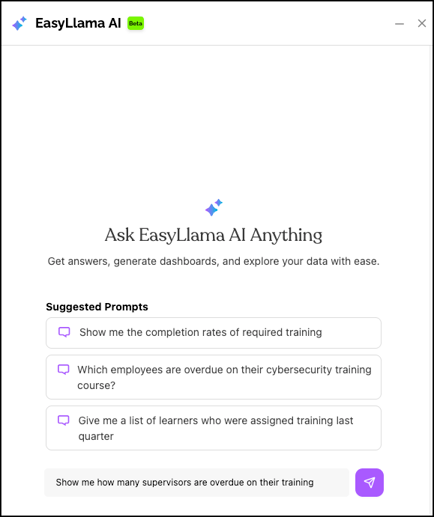
- From the top right-hand corner of the screen, click the EasyLlama AI button.

- Type in your question and click Send.
- View your results as charts, tables, or summaries.
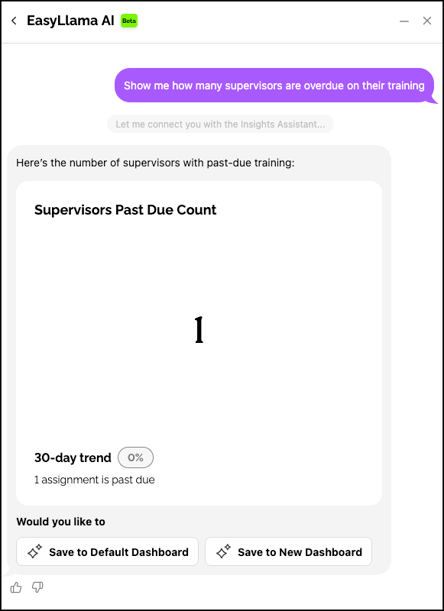
- If desired, you can refine your question, ask a follow up, or save to your default or a new dashboard.
Frequently Asked Questions
What kinds of questions can I ask?
You can ask about assignments, completions, due dates, recertifications, and learner progress. Examples include:
- Which learners have not started their assigned training?
- Show me completion rates for California harassment prevention training by department
- Who is due for recertification in the next 30 days?
- Generate an audit-ready report for Q2 completions
- How does the current completion rate compare to last quarter?
Do I need to know how to build reports?
No! You can simply ask EasyLlama AI your question in plain English and the system returns the data without the need for filters or pivot tables.
Can I ask for both internal and external reports?
Yes! The system supports both:
- Internal Views: “Show me all compliant learners by manager”
- Audit-Ready View: “Generate a completion report for California regulators”
Can I use EasyLlama AI for Security Awareness Training data?
Not yet! Future phases will include Phishing Simulator results — right now we are focused on learner compliance data like assignments, completions, and recertifications.
Is EasyLlama AI available for all plans?
Yes! EasyLlama AI is available for all admins, regardless of their plan.
How does this save me time?
Instead of:
- Navigating to the Learners tab
- Applying multiple filters
- Exporting reports to Excel
- Asking support for help with complex data needs
You can simply ask a question and get an answer that can be saved in your default or a new dashboard.
Can I share the results?
Yes! Any widget can be saved to a dashboard and shared company wide using the share settings. Reports and tables can also be exported, if desired. Learn more here: How to Share Advanced Insights Dashboards
What if I ask a question EasyLlama AI does not understand?
EasyLlama AI will suggest rephrasing or show you the data that is available to query, while improving itself over time.
Llama Fact: Llamas are naturally curious and communicate with a range of hums and sounds—much like how you can now "talk" to your training data and get clear answers!