![logolimanobkg-1.png]](https://help.easyllama.com/hs-fs/hubfs/logolimanobkg-1.png?height=40&name=logolimanobkg-1.png)
What you can see
- Phishing Susceptibility Risk Score with industry benchmark comparison
- Totals across campaigns: campaigns sent, emails delivered, high‑risk learners, and total fails
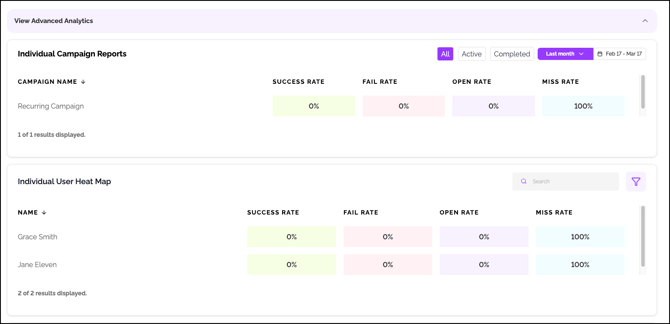
- Performance by campaign: success, fail, open, and miss rates
- Learner‑level view with quick access to each person’s campaign history and outcomes
- Trend lines over time for your overall risk score
- Team or department breakdowns when departments are enabled
Deeper analysis with the Risk Analysis Report
Generate a Risk Analysis Report to surface:
- Your unique risk patterns versus industry average and best practice
- Key observations drawn from recent campaign performance
- A list of learners who need additional coaching
- Recommended next campaigns and program steps tailored to your environment
Why it helps
- Track progress toward lower risk with clear, shareable metrics
- Identify who needs support and where to focus training
- Give stakeholders program visibility and business impact
Where to find it
Those with access to the Phishing Simulator through a Core/Ultimate plan, or Legacy Security Awareness subscription can go to Phishing Simulator > Reports 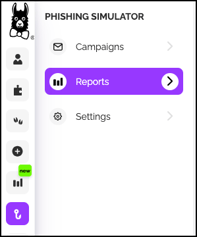
Reporting and Insights Options
View Report (Human Risk Intelligence Report)

Click View Report for a shareable, data-driven overview of your organization's security awareness risk and practical steps to reduce it. For more details on this report, see Risk Analysis Report Overview
Overview Tab
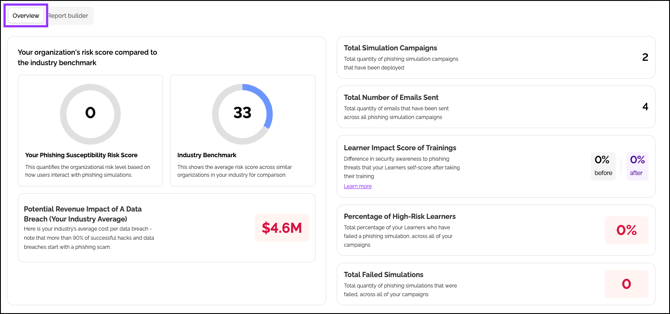
Scroll through the Overview tab to view basic KPIs and trendlines for your campaigns. For more advanced data, scroll to the bottom of the page and click View Advanced Analytics to expand a section of clickable reports that allow you to drill down into your campaigns, teams, departments, and learners for details.
Report Builder
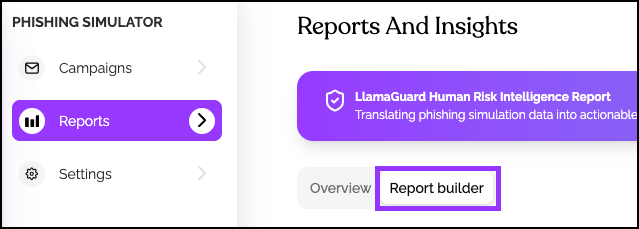
Click Report Builder to access report templates, including a Campaign Activity Report and a Campaign Enrollment Report. Just click Use this template on any template to run a report.
You can also describe the type of report you would like, and click Create Report.

Helpful Tips
- Look for downward movement in the risk score over time
- Use department views to compare teams and target enablement
- After each campaign cycle, review fails and assign just‑in‑time coaching
Frequently Asked Questions
What is the Phishing Susceptibility Risk Score?
A metric that measures your organization's overall risk level based on learner responses to phishing campaigns. It includes industry benchmark comparisons so you can see how you stack up.
How often are reports updated?
Reports update in real-time as campaign data comes in. For trend lines, data accumulates over time for historical comparison.
Can I see individual learner performance?
Yes. Drill down to the learner level to view each person's campaign history, outcomes, and risk status.
How do I identify who needs coaching?
Use the Risk Analysis Report—it automatically generates a list of learners who need additional coaching based on campaign performance.
Can I compare teams or departments?
Yes, when departments are enabled in your account, reports include team/department breakdowns for comparison.
What's the difference between Overview and Risk Analysis Report?
The Overview tab provides basic KPIs and trends. The Risk Analysis Report offers deeper analysis, including risk patterns, observations, and tailored recommendations for next steps.
How do I track progress over time?
Monitor trend lines on the Overview tab and look for downward movement in the risk score—that indicates improvement.
What should I do after each campaign?
Review fail rates, identify learners who struggled, and assign just-in-time coaching or targeted Llama Bites to reinforce learning.
Llama Fact: Llamas are naturally vigilant and excellent at spotting potential threats—just like a good phishing simulator helps your team spot dangerous emails before they cause harm!