![logolimanobkg-1.png]](https://help.easyllama.com/hs-fs/hubfs/logolimanobkg-1.png?height=40&name=logolimanobkg-1.png)
Required
Who must sign in: a Google account that can authorize Admin SDK Directory API access for the customer’s Google Workspace (typically a Workspace super admin or someone with rights to approve the app for the org). For more information, click here to view an article from Google Workspace.
To ensure a successful sync:
Users must be active Google Workspace users in the directory.
- Suspended or archived users are treated as terminated for sync and are not kept as active learners the same way as active users.
The Google Integration does not currently supply region data. Please keep this in mind when using Smart Assign.
- If you rely on state- or region-specific courses, plan to set location/region/address in EasyLlama another way (manual updates, another integration, or internal process).
Useful to know for data quality
- Start date in EasyLlama is filled from the user’s Google
creationTime(when the Google account was created), which is not necessarily a formal HR hire date. - Employment type is inferred from the user’s first organization entry’s
descriptionfield in Directory. Employment Type defaults to Full Time if another Employment Type is not detected.
Fields that sync
Google Directory → EasyLlama
| Google (Directory user / behavior in app) | EasyLlama |
|---|---|
name.givenName, name.familyName (and middle if present) — chosen by integration name setting (legal / preferred / automatic) |
Name |
name.givenName |
Preferred name (implementation uses the same as given name; there is no separate Google “preferred name” field) |
organizations → first entry → title |
Title |
recoveryPhone |
Phone (only if the company has the SMS feature; otherwise phone is not saved) |
primaryEmail |
Email (treated as work email) |
creationTime |
Start date (account creation time in Google, not a dedicated HR hire date) |
id |
Employee ID |
organizations → first entry → description |
Employment type |
isAdmin / isDelegatedAdmin |
Role (supervisor if either admin flag is true, else non-supervisor) |
suspended or archived |
Status |
To get started:
-
From your EasyLlama dashboard, go to Settings > Integrations
-
Click Connect on the Google Directory tile.
-
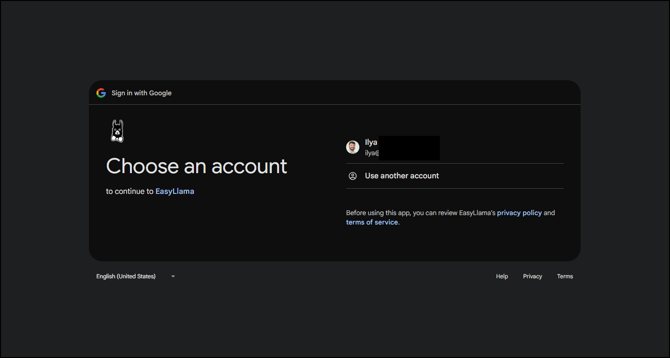
You will be directed to Google account chooser - select your account
-
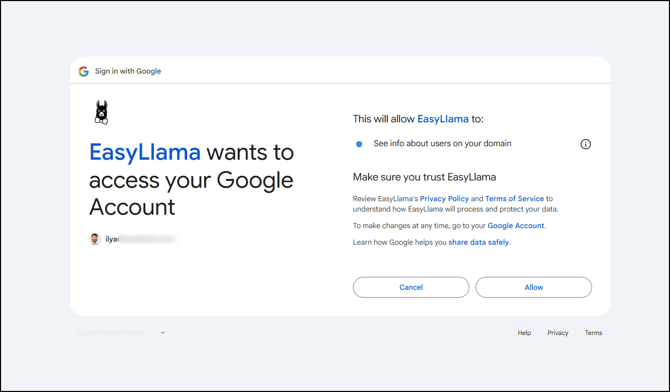
Allow EasyLlama access to Google. For example:
-
On the Google Directory Setup page, select the desired integration settings and automations.
-
You are redirected to the EasyLlama Integrations Page once complete.
-
You may click the three dots on the Google Directory tile and then "Settings" to adjust the synchronization or Integration Settings before synchronizing. Click here for a Settings guide.