![logolimanobkg-1.png]](https://help.easyllama.com/hs-fs/hubfs/logolimanobkg-1.png?height=40&name=logolimanobkg-1.png)
When connecting an integration after adding Learners to your dashboard manually, through file upload, or through a different integration, duplicate records are often created. Email is the primary unique identifier to prevent duplication of records. The most common reason for duplicates is a non-matching email address. If there are no emails, Internal ID is used to match records.
In this article we will discuss scenarios where the email or ID may not match, how to diagnose this issue, and how to resolve it.
What Causes This Error
- Email mismatch: The work email in the HRIS differs from email in EasyLlama
- No email in original record: A learner was added without email, so the system can't match them to the record
- No email in HRIS: The integration cannot sync data that is not in the HRIS
- Email format changes: Company changed naming conventions (e.g., first.last vs. firstinitiallast)
- Personal emails: HRIS contains the learner's personal email, instead of the work email
- Integration permissions: Insufficient access to sync email fields
- Duplicate HRIS records: Employee appears twice in the source system
Immediate Actions
- Check email addresses between original and duplicate records
- Add email column to Learners view if not visible
- Sort by Name to easily spot duplicates
- Don't assign courses to duplicates until resolved
Diagnosing and Resolving Common Duplication Issues
Fix 1: Identify and Preserve the Correct Record
The simplest way to look for duplicates is by sorting your Learners by name and scanning for duplicates.
- Go to Learners tab and ensure Email column is visible (use column selector if needed) See: How do I add or remove columns from my dashboard view?
- Click Name column header to sort alphabetically
- Scan for duplicate names (same person appearing twice)
- For each duplicate pair:
- Identify which record has completed training (look for "Compliant" or "Completed" status)
- This is your original record to keep
- The duplicate will likely show "Due" or "In Progress" status
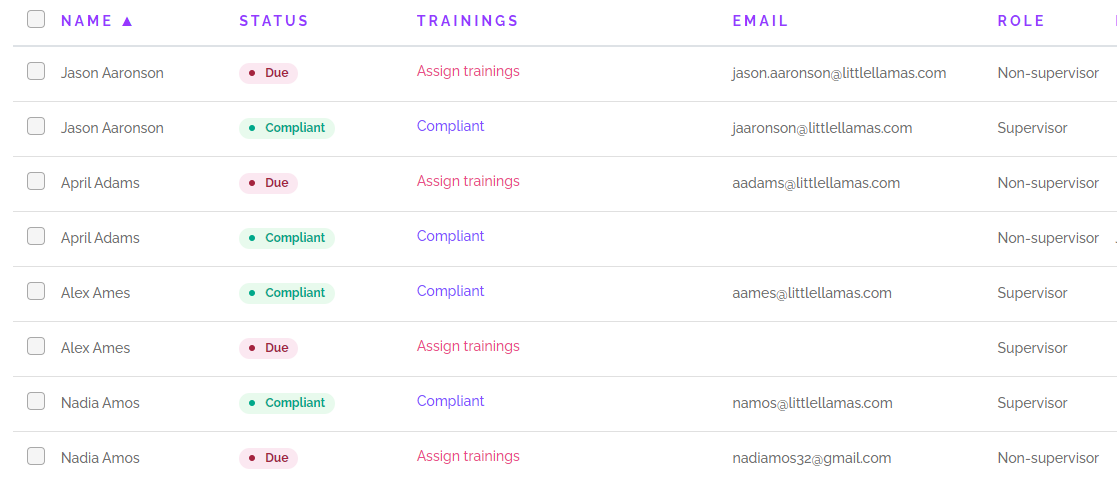
Here is an example of how duplicate records may look in a dashboard:
Fix 2: Resolve Email Mismatch and Remove the Duplicate
Try this if: You've identified which record to keep
- Click the original record (the one with training history).
- Select Edit and update the email to match the correct work email.
- Click Save Changes.
- Return to the Learners list and check the duplicate record.
- Select the duplicate and choose Archive (this removes it without deleting training history.)
- Confirm archiving when prompted.
Note: Always keep the record with completed training history. Archiving removes the duplicate but preserves compliance data.
Duplicate Examples and Resolutions
Diagnosis: Work email format has changed or was entered incorrectly

Jason has a @littlellamas domain for both emails, but the format has changed. In the original record the format was jaaronson, while in the synced record it's jason.aaronson.
Resolution: Determine which email is correct.
-
If it's the one on the original record (jaaronson), correct it in the HRIS, and archive the new record.
-
If it's the one on the new record (jason.aaronson), edit the original record to add the correct email, and archive the new record. This will preserve the original record with the Learner's training history.
Diagnosis: No email was present on record in the dashboard

April's original record had no email, so there was nothing to match, causing a duplicate to be created with her work email.
Resolution: Edit the original record to add the email address and then archive the new record.
Diagnosis: No email was present in the HRIS

Alex's original record had the correct work email address, but no email was synced from the HRIS. They may not have an email in the HRIS, or it's possible that insufficient privileges have been granted to the integration, or the user who set it up is lacking permissions.
Resolution: Add the email to Alex's record in the HRIS and archive the new record in EasyLlama.
Diagnosis: Learner has a personal email as their Work Email in the HRIS

Nadia's original record has her work email address, but the synced record has a personal email address.
Resolution: Add the Work email in your HRIS and archive the new record.
Other Issues and resolutions
When setting up the integration, insufficient privileges were granted
When setting up some integrations, specific permissions must be set up - if permission wasn't granted correctly, the email (or other important information) may not be sent. This could also occur if the user connecting the integration doesn't have sufficient privileges.
Resolution: Remove the integration and start again, making sure to follow all the steps and grant the correct permissions. If you think you may not have sufficient privileges, please contact your IT department or person responsible for administering your HRIS for assistance.
The Learner has two records in your HRIS
This is very uncommon, but if you can find no other reason for duplication, make sure to check your HRIS for a duplicate record - usually with a different email address. The resolution for this will depend on your internal policies and practices. If it's not possible to remove one of the records, you can reach out to support@easyllama.com for further assistance. Just let us know all the details and we can help you find a solution.
There was an error with the integration
This is rare, but it does happen occasionally - if you can find no reason for duplicate records being added, please reach out to support@easyllama.com for assistance.
When to Get Help
Contact support@easyllama.com if:
- You can't determine which record to keep
- Both records have training history
- The duplicate has a different Internal ID causing conflicts
- You suspect an integration error
What to tell support:
- Screenshot showing duplicate records
- Email addresses involved
- Which record has completed training
- Steps you've already tried
Llama Fact: Llamas are herd animals that recognize each other by sight and sound—just like EasyLlama uses email as the primary way to "recognize" and match learners!