![logolimanobkg-1.png]](https://help.easyllama.com/hs-fs/hubfs/logolimanobkg-1.png?height=40&name=logolimanobkg-1.png)
Before You Start
What You’ll Need
- Administrative access to the dashboard
- New card details ready (if adding or replacing)
- Understanding that you must always have at least one card on file
- Access to Settings > Billing
Quick Reference
- Primary method: Manage cards by going to Settings > Billing
- Key rule: Add a new card before removing an old one
Manage Payment Cards
Step 1: Access payment method settings
- Log in to the Dashboard.
- From the left navigation menu, click Settings > Billing.
- Locate the Payment methods section.
Step 2: Perform the desired action
To Add a New Card:
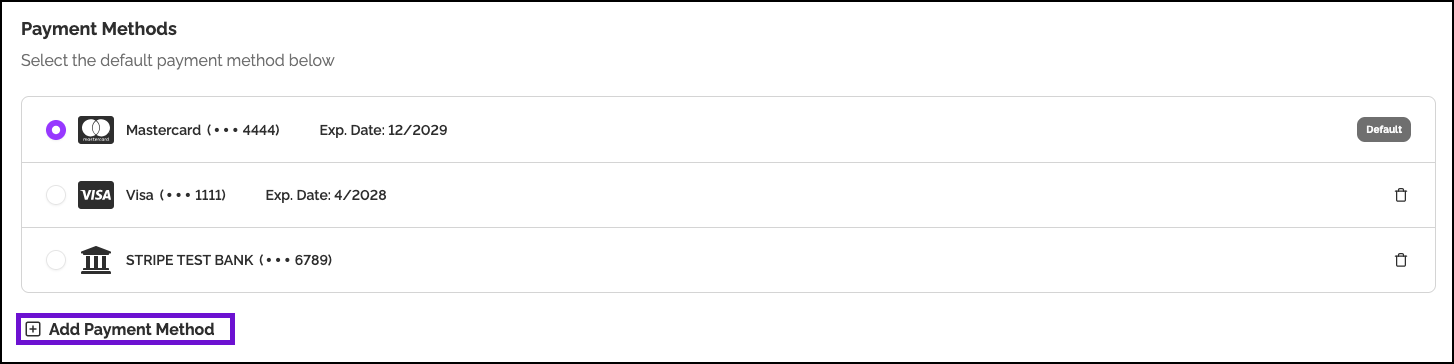
- Click + Add Payment Method
- Select Card
- Enter card number, expiration date, CVV, Country, and ZIP code.
- Click Add Card
To Update/Change Preferred Card (if multiple cards on file):
- Select which card should be the primary payment method by clicking the bubble to the left of the payment method

To Remove a Card:
NOTE: You can only remove a card after adding a replacement. The system requires at least one valid payment method at all times.
- To the right of the card that should no longer be used, click the Trash Can icon.

- Confirm deletion
Helpful Tips
Do not remove a card without replacement
The system prevents card removal unless another valid card is on file. Always add the new card first. If you would like assistance removing the card as a payment method, contact support at Support@EasyLlama.com with the last 4 digits of the card you would like removed.
Avoid using expired or expiring cards
Update cards well before their expiration date to prevent failed payments and potential service interruptions.
Set a primary card when there are multiple cards on file
If you have multiple cards, designate the correct primary card to ensure the intended payment method is used.
Quick Questions
Why can’t I remove my only card?
EasyLlama requires at least one valid payment method on file at all times for subscription continuity. Add a new card first, then remove the old one.
Can I have multiple cards on file?
Yes. You can store multiple cards and designate one as the primary payment method for automatic charges.
What happens if my card expires?
Update the card before its expiration date. If a charge fails due to expiration, you’ll be notified to update payment information to avoid service interruption.
Llama Fact: Llamas are reliable and consistent in their habits—similar to how maintaining an updated payment card ensures reliable, uninterrupted access to your training platform!