![logolimanobkg-1.png]](https://help.easyllama.com/hs-fs/hubfs/logolimanobkg-1.png?height=40&name=logolimanobkg-1.png)
Before You Start
What You'll Need
- Administrative access to your EasyLlama dashboard
- A previously customized course that is currently active for learners
Important Notes
- This change affects future learner assignments only
- Learners already assigned to the customized version will continue with that version
- To reassign learners to the original version, you would need to unassign and reassign them separately
Quick Reference
- What changes: Future enrollments use the original EasyLlama Expert Course instead of the custom version
- What stays the same: Existing assignments to the customized version remain unchanged
- Location: Training > Library > Course > Currently Active for Learners module
Switch to the Original Course Version
Step 1: Locate the Course
- Go to Training > Library
- Use the search bar or filters to find the customized course
- Click into the course
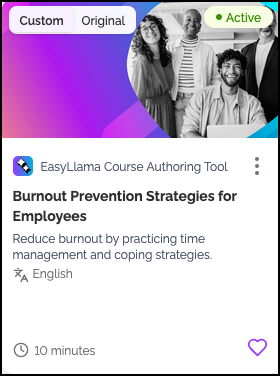
Step 2: Find the Active Version Module
On the course page, locate the Currently Active for Learners module.

Step 3: Select Original Version
Click Original Version to indicate you want to switch from the custom version back to the original.

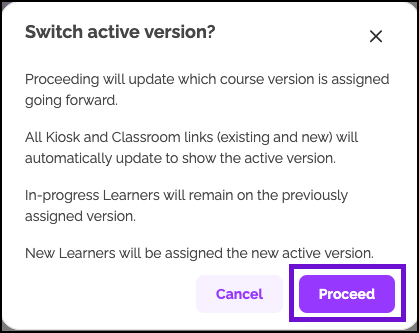
Step 4: Confirm the Switch
When prompted, click "Proceed" to activate the original version for new Learners.
What Happens After Switching
| Scenario | Outcome |
|---|---|
| New learners assigned after switch | Receive the original EasyLlama Expert Course |
| Learners already assigned to customized version | Continue with the customized version (no automatic change) |
| Customized course | Remains available in your library for potential future use |
Quick Questions
Will learners lose their progress if I switch course versions?
No. Learners already assigned to the customized version keep their progress. Only new assignments are affected.
Can I switch back to the customized version later?
Yes. You can switch between versions at any time using the same process.
What if I want all Learners to use the same version?
You would need to unassign the customized version for existing Learners and reassign the course.
Does switching delete my customized course?
No. The customized version remains associated with the EasyLlama Expert Course in the Course Library. You can reactivate it at any time.
Llama Fact: Llamas are adaptable and can switch paths when needed—similar to how you can
switch course versions based on your organization's evolving training needs!