![logolimanobkg-1.png]](https://help.easyllama.com/hs-fs/hubfs/logolimanobkg-1.png?height=40&name=logolimanobkg-1.png)
Before You Start
What You'll Need
- Administrative access to the EasyLlama dashboard
- Understanding of your organization's harassment policies
- Clear customization goals
- Access to Compliance and LMS Subscriptions
Quick Reference
- Eligible courses: Official Harassment Prevention Expert Courses only
- Legal guidance: Review Legal Tags on compliance-critical slides
- Time enforcement: Course Timer ensures mandated duration
- Template limits: Some slides have restricted editing
Features
- Replace the original course with a custom version
- Maintain existing assignments for learners
- Preserve rules and automation
- Continue recertification logic
- Avoid workflow recreation
- Add AI Translations
Create a Custom Harassment Prevention Course
For Harassment Prevention trainings, requirements may vary by state or region and can include:
- Required knowledge checks
- Interactive elements
- Coverage of specific laws or definitions
- Minimum time requirements
If you make changes to a course, those changes may affect compliance.
- Light copy edits typically do not materially impact compliance.
- Changing slide templates, removing sections, or swapping videos may affect required timing or legal coverage.
We recommend reviewing all changes carefully before assigning a customized Harassment Prevention course.
Step 1: Access Training Library
- Log in to the Dashboard.
- From the left navigation menu, click Trainings > Library.
Step 2: Filter for eligible courses
- Apply the Harassment and Discrimination filter and click Apply.\
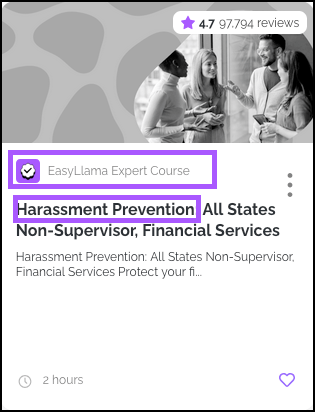
- Identify courses with both:
-
- "EasyLlama Expert Course" designation
- "Harassment Prevention" in the title
Step 3: Create a custom version
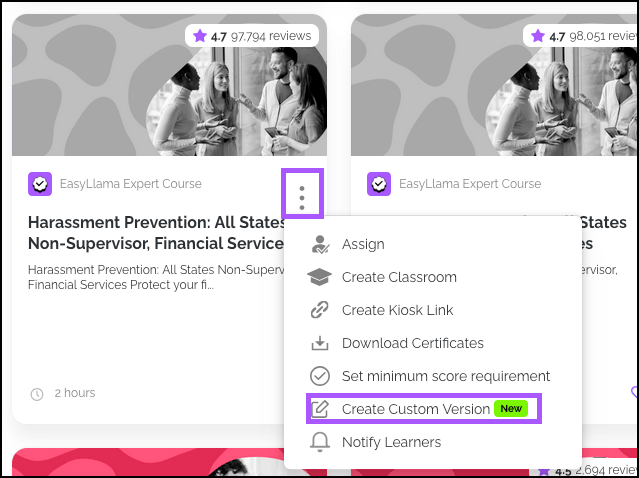
- Click the three-dot menu (⋮) on the course card.
- Select Create Custom Version.
- System creates an editable copy in the Course Authoring Tool.
Customization Guidelines
Editing Capabilities
Full editing permissions include:
- Add/delete slides to match organizational needs
- Edit text directly on slides for policy-specific language
- Change images and videos to reflect your workplace
- Update or swap narrations with custom audio
- Reorder content to improve learning flow
Legal Tags & Compliance Considerations
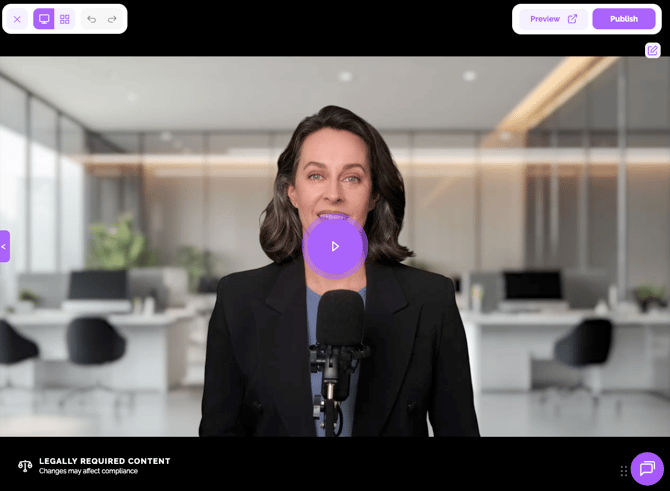
US Harassment Prevention courses feature Legal Tags:
- Location: Bottom left corner of legally required slides
- Purpose: Identify content required for legal compliance
- Review required: Before making significant changes. Light copy edits do not materially impact compliance, but changing slides, removing sections, or swapping videos may affect required timing or legal coverage.
Compliance impact by edit type:
Lower risk (typically compliant):
- Minor text edits for clarity
- Adding organization-specific examples
- Simple image replacements
- Non-substantive formatting changes
Higher risk (may affect compliance):
- Removing slides with Legal Tags
- Changing interactive elements or knowledge checks
- Deleting legally mandated content sections
- Altering definitions of protected categories
Template Limitations
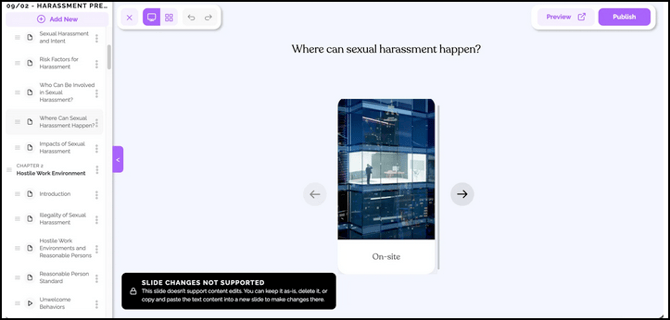
Some slide templates have editing restrictions:
- Identified by: Label in the bottom left corner of the editor
- Workaround: Copy content to a new supported slide
- Alternative: Contact support for assistance
Mandated Time Requirements
Course Timer Feature
Prefer a video? Click here
Enabled in Training Settings, Course Timer:
- Enforces minimum duration for time-mandated courses
- Prevents early completion even if the content is removed
- Maintains compliance with jurisdictional requirements
Minimum Duration Requirements
Keep Course Timer ENABLED for these courses:
2-Hour Requirements:
- Harassment Prevention, CA Supervisor
- Harassment Prevention, City of Chicago Supervisor
- Harassment Prevention, Connecticut Supervisor
- Harassment Prevention, Connecticut Non-Supervisor
- Harassment Prevention, All States Supervisor
- Harassment Prevention, All States Non-Supervisor
1-Hour Requirements:
- Harassment Prevention, CA Non-Supervisor
- Harassment Prevention, City of Chicago Non-Supervisor
- Chicago Bystander Intervention
Post-Customization Management
Pre-Assignment Review
Before deploying custom courses:
- Preview the entire course for flow and completeness
- Verify Legal Tags remain on required slides
- Test with sample users for clarity
- Confirm timing meets minimum requirements
- Review with legal counsel if substantial changes are made
Helpful Tips
Do not remove legally mandated content
Always check for Legal Tags before deleting slides. Consult legal counsel when uncertain.
Do not disable the Course Timer
Keep Course Timer enabled for all Harassment Prevention courses to ensure compliance with time requirements.
Avoid over-customizing compliance slides
Balance organizational needs with legal requirements. Some content may need to remain substantively unchanged.
What's Next?
Quick Questions
Which courses can be customized?
Only official Harassment Prevention courses (identified as "EasyLlama Expert Course" with "Harassment Prevention" in the title) from the Training Library.
What if I remove required compliance content?
Review the original course and Legal Tags. You may need to restore content or consult legal counsel to ensure compliance.
Does Course Timer work on custom versions?
Yes. Course Timer applies to custom copies of time-mandated Harassment Prevention courses and enforces minimum duration.
Can I translate custom Harassment Prevention courses?
Yes, using translation features, but ensure legal terminology remains accurate across languages.
Llama Fact: Llamas establish clear social boundaries—similar to how well-customized harassment prevention training helps establish clear behavioral boundaries in your organization!