![logolimanobkg-1.png]](https://help.easyllama.com/hs-fs/hubfs/logolimanobkg-1.png?height=40&name=logolimanobkg-1.png)
Before You Start
What You'll Need
- Administrative access to your EasyLlama dashboard
- Access to Settings > Training Settings
Quick Reference
- Purpose: Enforce the legally required minimum course duration
- Toggle Location: Settings > Training Settings
- ON: Learners cannot complete time-mandated courses until the minimum time is met
- OFF: No time enforcement; learners can complete at any pace
- Applies to: All courses with mandated time requirements (e.g., Harassment Prevention CA Supervisor: 2 hours)
Enable the Course Timer
Step 1: Access Training Settings
- Log in to the Dashboard
- From the left navigation menu, click Settings > Training Settings.
Step 2: Locate the Course Timer option
From the Training Settings page, scroll to find the Course Timer setting.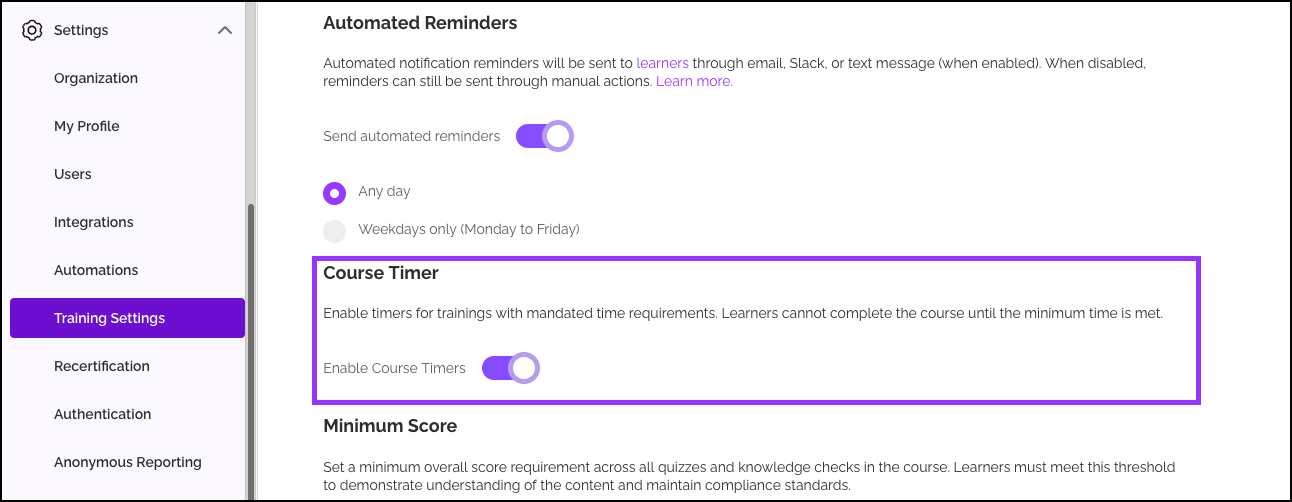
Step 3: Toggle the timer ON or OFF
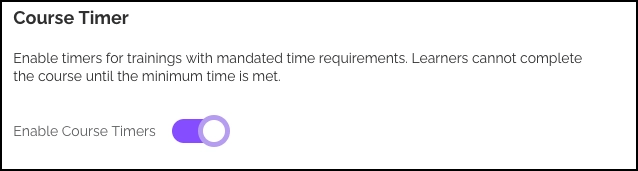
- Toggle ON (purple): Time enforcement is active. Learners must spend the mandated minimum time in any course with a legal time requirement before they can complete it.
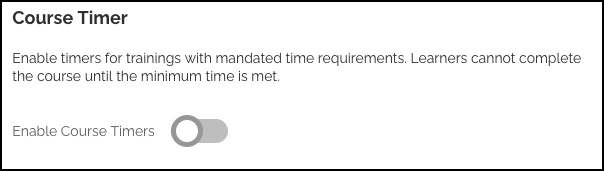
- Toggle OFF (gray): Time enforcement is disabled. Learners can complete courses at their own pace, regardless of mandated minimum duration.
Step 4: Save the setting
Scroll to the bottom of the page and click Save to apply the selection.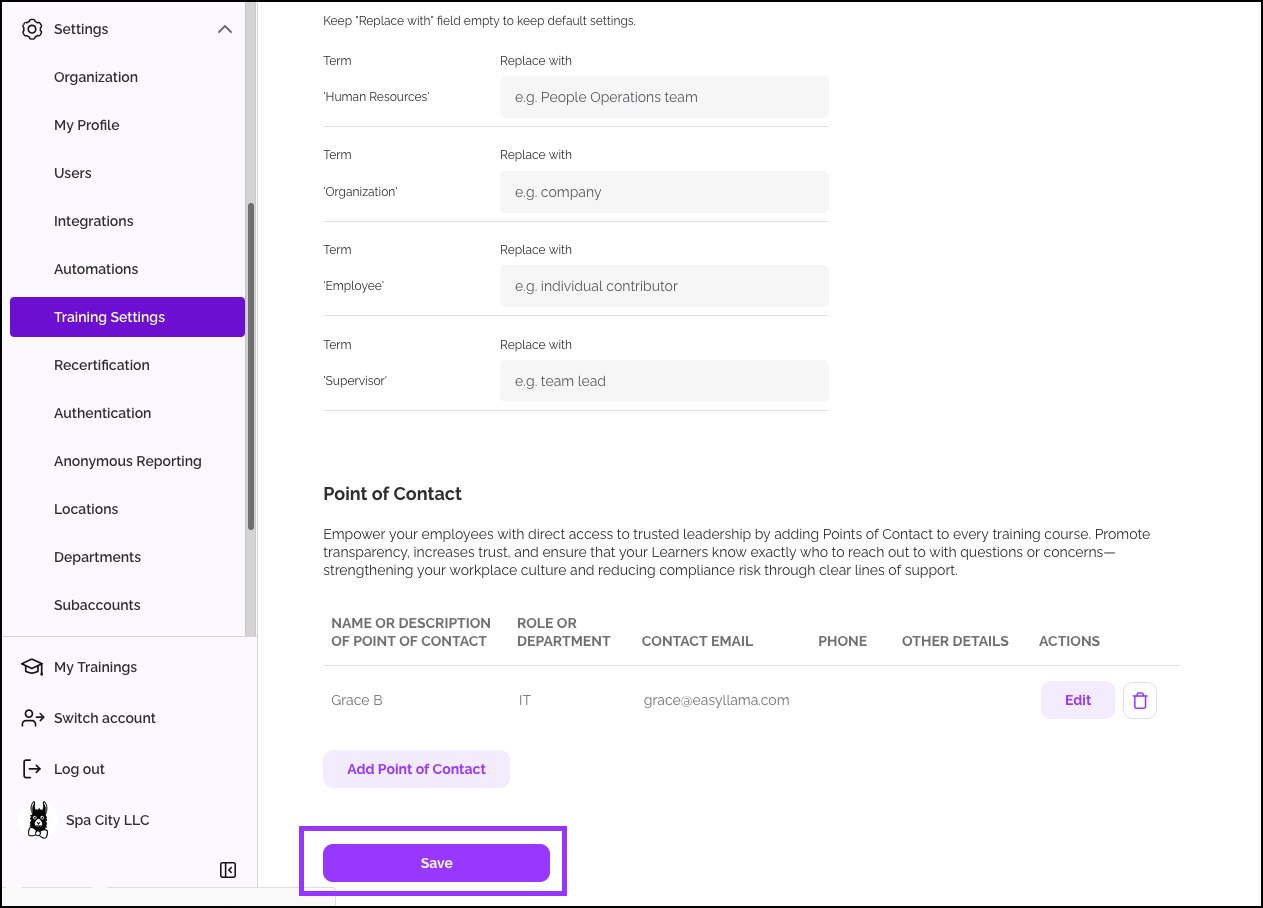
How the Course Timer Works
When Enabled (ON)
For any course with a mandated minimum time requirement (e.g., Harassment Prevention California Supervisor: 2 hours):
- The course timer starts when the learner begins the course
- Learners cannot complete the course until the required time has elapsed
- Learners must actively progress through the slides, timer pauses if it detects more than 2 minutes of inactivity
- If they try to finish early, they'll be blocked and notified of the remaining time
- Progress is saved; they can return later to complete it once the time requirement is met
When Disabled (OFF)
- No time enforcement for any course
- Learners can complete courses at any pace
Which Courses Are Affected?
The Course Timer applies to all EasyLlama courses with mandated time requirements, including:
2-hour requirements:
- Harassment Prevention, CA Supervisor
- Harassment Prevention, City of Chicago Supervisor
- Harassment Prevention, Connecticut Supervisor
- Harassment Prevention, Connecticut Non-Supervisor
- Harassment Prevention, All States Supervisor
- Harassment Prevention, All States Non-Supervisor
1-hour requirements:
- Harassment Prevention, CA Non-Supervisor
- Harassment Prevention, City of Chicago Non-Supervisor
- Chicago Bystander Intervention
NOTE: Any course with a legal time requirement will be affected.
Compliance Considerations
Why Keep the Timer ON?
- Legal compliance: Many jurisdictions mandate minimum training duration for specific courses
- Audit protection: Demonstrates that learners spent the required time on regulated content
- Consistency: Ensures all learners receive the same minimum exposure to critical compliance topics
When Might You Turn It OFF?
- Testing or pilot programs where pace isn't regulated
Helpful Tips
Understand which courses will apply timer settings
Only courses with mandated legal time requirements are affected. The timer doesn't apply to non-regulated courses.
After toggling the setting, be sure to save the changes
Always click Save at the bottom of the Training Settings page after changing the toggle. Settings aren't applied until saved.
Quick Questions
What happens if a learner tries to finish early?
They'll see a message indicating they haven't met the minimum time requirement and need to continue. Their progress is saved, and they can return later.
Does the timer apply to SCORM Exports?
Yes! Enabling the timer enables the feature for courses with a mandatory minimum time limit, including SCORM exports. However, it will not work for SCORM imports.
Does the timer pause if they log out?
Yes. The timer only counts time when the learner is actively in the course. After 2 minutes of activity, the timer will pause. Logging out stops the timer until they log back in.
Can I enable timers for courses I’ve created using the Course Authoring Tool?
Please reach out to Support@EasyLlama.com with the name of the course you’d like to enable a time limit for.
Llama Fact: Llamas are known for their patience and will wait for the right moment—just as the Course Timer ensures learners spend the required time before completing important compliance training!