![logolimanobkg-1.png]](https://help.easyllama.com/hs-fs/hubfs/logolimanobkg-1.png?height=40&name=logolimanobkg-1.png)
Before You Start
What You'll Need
- Administrative access to the EasyLlama dashboard
- Learner records with managers assigned (manager must exist in system)
- A designated Point of Contact configured in Settings (See Note below)
- Access to Notification Settings
Quick Reference
- Trigger: One day after training due date
- Scope: All courses (excluding optional courses)
- Email Cadence: Follows the same schedule as learner reminders (Days 1, 4, 7, 14, 21, 30, 45, 60, 90)
- Stop Point: No emails after Day 90
- Resolution: Automatic email when learner completes training
- Requirement: Learner must have a manager assigned to them in their profile
Important Note: A Point of Contact is Required
Before enabling manager escalations, ensure you have at least one Point of Contact configured. This contact information appears in escalation emails so managers know who to reach out to with questions. Without a Point of Contact, escalation emails will lack internal contact information for managers. Click here to learn how to add a point of contact.
Enable Manager Escalations
Step 1: Access Notification Settings
- Log in to the Dashboard.
- From the left navigation menu, go to Settings > Notifications.
Step 2: Locate and enable manager escalation setting
Under Company-wide notifications, toggle “Send an email to learner managers when one of their direct reports has a training that is past due” ON to activate manager escalations.
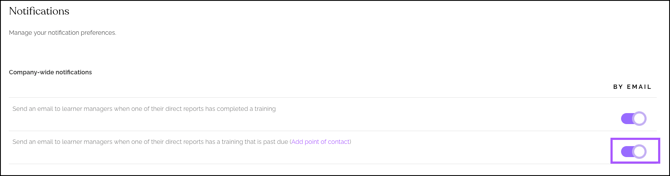
NOTE: This setting applies to all courses except those marked as optional. Optional courses will not trigger manager escalations.
Step 3: Save the Changes
Scroll to the bottom of the page and click Save. Manager escalation is now active forpast due training email alerts.
How Manager Escalations Work
What Triggers an Escalation?
- All assigned courses with due dates are eligible (excluding courses marked as optional)
- Escalation triggers one day after the training due date passes
- The system checks nightly and sends emails accordingly
Resolution Behavior
When a learner completes the overdue training:
- Escalation logic stops immediately
- Managers receive a completion notification email confirming the training is done
- No further actions required
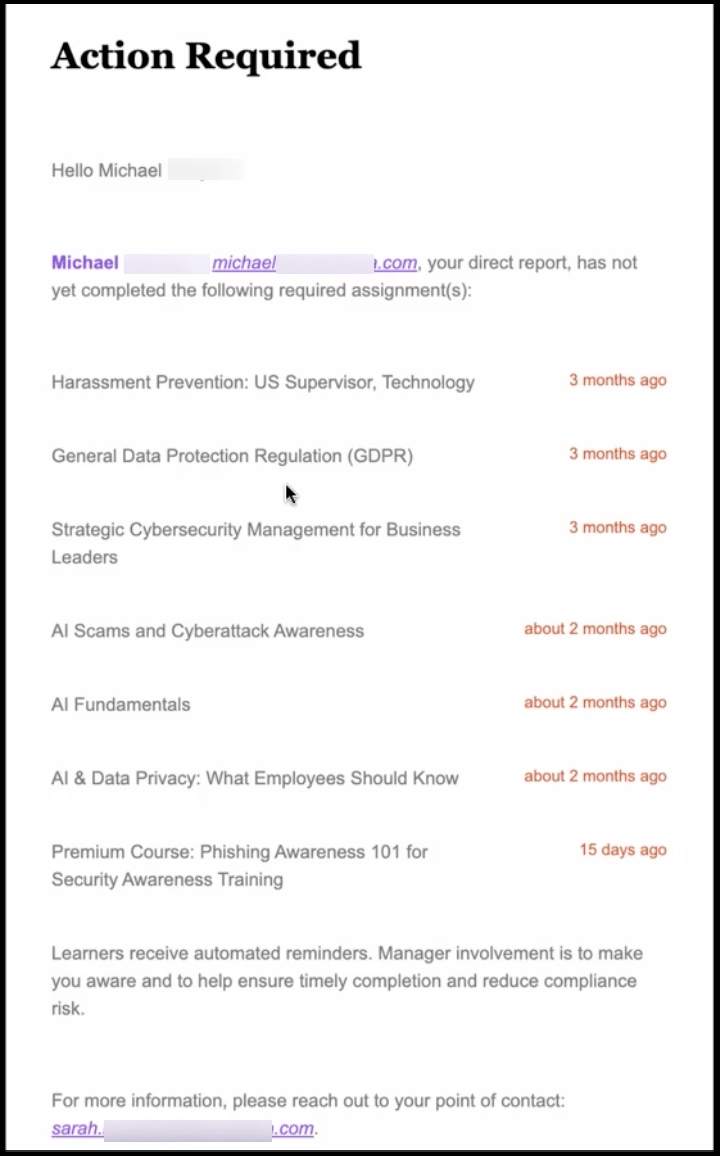
What Managers See in Escalation Emails
Manager emails include:
- Learner's name and overdue course(s)
- Original due date
- Days past due
- Point of Contact information (from Training Settings) for internal follow-up
- Link to learner portal (if applicable)
Llama Fact: Llamas naturally look out for herd members and alert others to concerns—similar to how manager escalations alert leaders when their team members need support with compliance training!