![logolimanobkg-1.png]](https://help.easyllama.com/hs-fs/hubfs/logolimanobkg-1.png?height=40&name=logolimanobkg-1.png)
Upload your own custom training content (SCORM, AICC, xAPI, cmi5, LTI) to your EasyLlama dashboard and manage them alongside your EasyLlama courses with full tracking, assignment, and recertification capabilities.
Before You Start
What You'll Need
- LMS package subscription - Want to learn more? Contact Accounts@EasyLlama.com for pricing and activation.
- A SCORM-compliant course file that is ready for upload
- Administrative access to the EasyLlama dashboard
- Course metadata: title, duration, description, thumbnail image (optional)
- Access to Training Library
Quick Reference
- Supported formats: SCORM 1.1, 1.2, 2004; AICC; xAPI (Tin Can); cmi5; LTI 1.1/1.3
- Capabilities: Assign manually or via HRIS, add to Learning Journeys, set recertification frequencies, track progress, download certificates, send notifications
- Location: Upload via Training Library > Upload training button
Upload a Custom SCORM Course
Step 1: Access the Training Library
- Log in to the EasyLlama Dashboard.
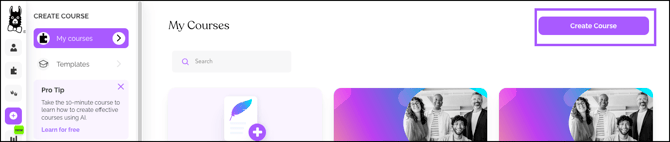
- From the left navigation menu, click Course Authoring.
Step 2: Initiate upload
- From the top-right hand corner, click the Create Course button.
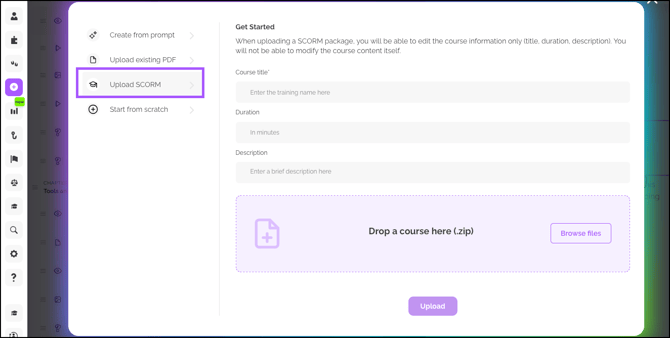
- Click Upload SCORM.
Step 3: Complete the upload form
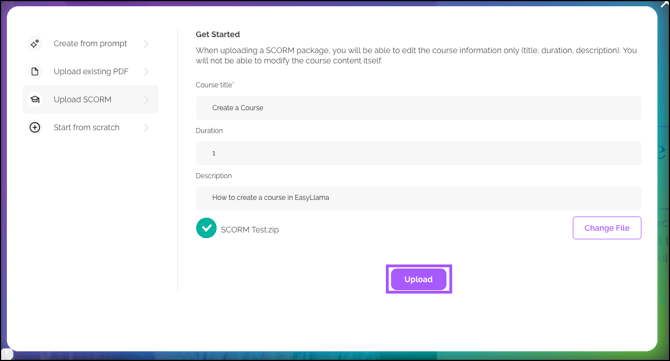
- Course Title – Enter a clear, descriptive name
- Duration – Estimated time to complete (in minutes or hours)
- Description – Brief summary (keep it concise; you can expand later)
- File Upload – Drag and drop your file or click to browse and select
- Click Upload to begin processing
Step 4: Wait for processing
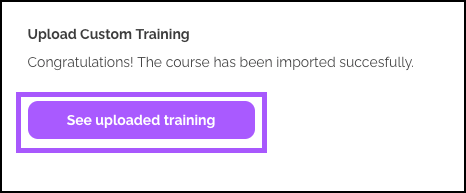
The system will display an upload progress screen. Wait for confirmation that the upload is complete, then click See uploaded training.
Step 5: Manage the course
You'll be taken to your course's dedicated page in the Training Library. From here you can:
- Assign Learners
- Recommend the course
- Share a Preview
Or, click the three-dot icon to:
- Edit Information - Title, Description, Tags, Duration, Category, Locations, Cadence, Upload an Image
- Set a minimum score requirement
- Notify Learners
- and more
Post-Upload Management
Assigning Your Custom Course
Once uploaded and published, your custom course behaves just like any EasyLlama course:
- Assign manually to individual learners or groups
- Include in Learning Journeys alongside EasyLlama content
- Auto-assign via HRIS integration (if configured)
- Filter by "My courses" when searching to easily find your uploaded content
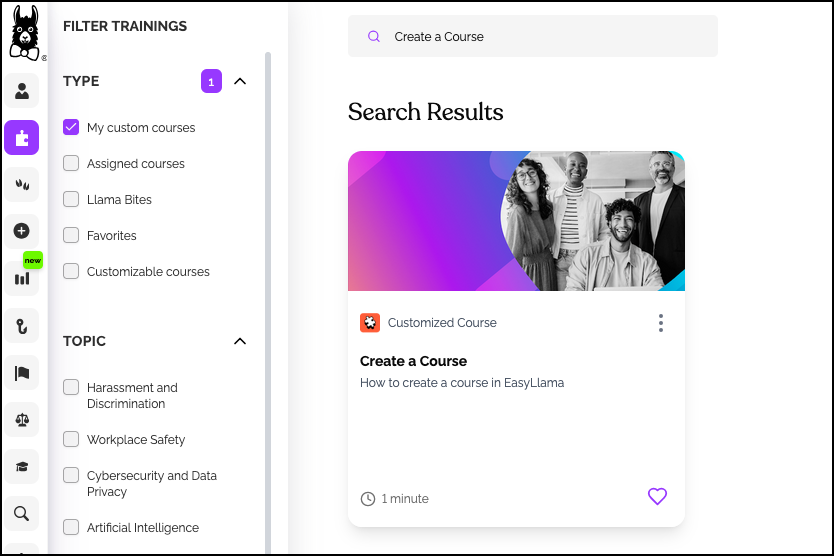
Setting Recertification Frequencies
- Go to Settings > Recertification
- Find your custom course - It’s listed under the Other drop down.
- Set desired recertification frequency (e.g., annually, biennially)
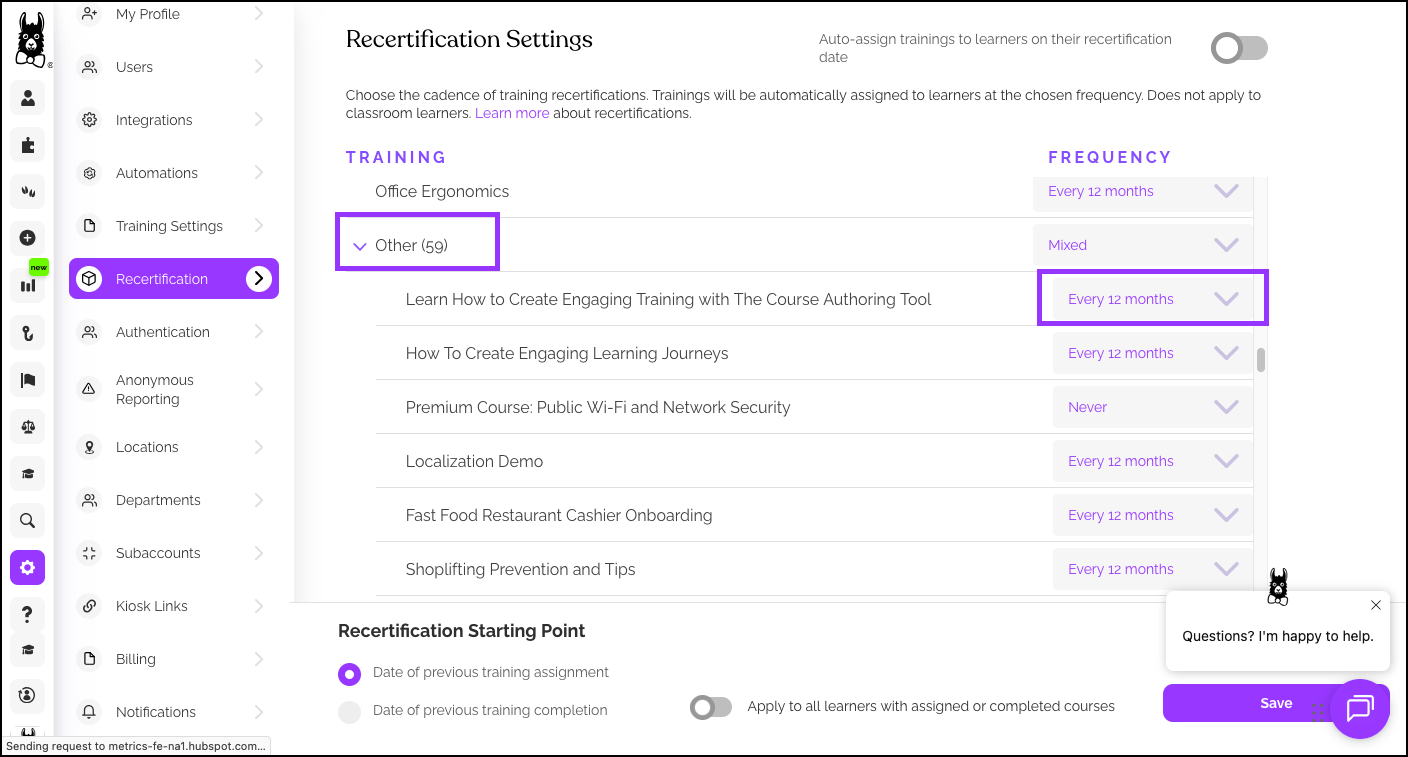
Custom courses can have their own recertification rules independent of EasyLlama's standard courses. To update this:
- Click on Training Library, and use the search/filters to find the course.
- Use the three dot icon, and click Edit Info.
- Under Cadence, select the recertification frequency.
- Click Save.
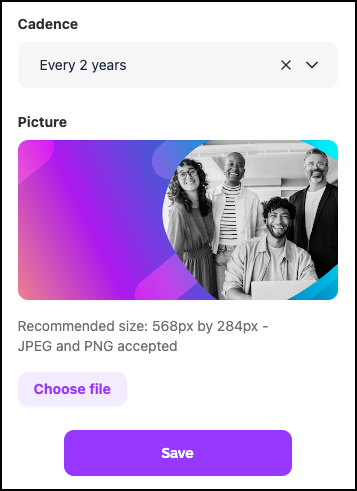
Tracking and Reporting
- Progress tracking – Monitor completion rates just like standard courses
- Certificate generation – Learners receive certificates upon completion
- Notifications – Send assignment reminders and completion alerts
- Insights & Reports – Include custom courses in all analytics views
Supported File Formats
| Format | Versions Supported |
|---|---|
| SCORM | 1.1, 1.2, 2004 (2nd, 3rd, & 4th editions) |
| AICC | 2.2, 3.5/4.0 HACP |
| xAPI | Experience API (formerly Tin Can API) |
| cmi5 | All versions |
| LTI | 1.1, 1.3 |
Helpful Tips
Upload supported formats
Before uploading, verify the course files are in one of the supported SCORM/AICC/xAPI/cmi5/LTI formats.
Preview the course before assigning it to learners
Preview your uploaded course and test with a small group to ensure it functions as expected.
Set recertification rules, if needed
Custom courses don't have default recertification rules. Set them manually in Settings > Recertification if needed.
Quick Questions
Can I upload SCORM courses without the LMS package?
No. The ability to upload custom SCORM content requires the LMS package. Contact Accounts@EasyLlama.com for pricing and activation.
Will custom courses work with automatic recertification?
Yes, once you set the recertification frequency in Settings > Recertification, they'll follow the same automatic rules as EasyLlama courses.
Can learners download certificates for custom courses?
Yes. Learners receive certificates upon completion, just like with EasyLlama's standard courses.
How do I find my uploaded courses when assigning?
Use the filter for My courses in the course selection dropdown to see only your custom content.
Llama Fact: Llamas are adaptable learners who can navigate various terrains—similar to how the LMS package lets you navigate and manage diverse training content from one central hub!