![logolimanobkg-1.png]](https://help.easyllama.com/hs-fs/hubfs/logolimanobkg-1.png?height=40&name=logolimanobkg-1.png)
Note: This feature is particularly important for complying with California and Connecticut harassment prevention training mandates that require a designated point of contact.
What is the Point of Contact Feature?
The Point of Contact feature allows administrators to:
- Comply with legal requirements for harassment prevention training
- Provide dedicated and customizable contact information for learners
- Offer accessible, in-context support for employees
- Create multiple points of contact for different departments or needs
Step-by-Step Setup Guide
Step 1: Access Training Settings
- Log in to your Easy Llama admin account
- Navigate to Settings
- Select Training Settings
- Scroll down to find the Point of Contact section
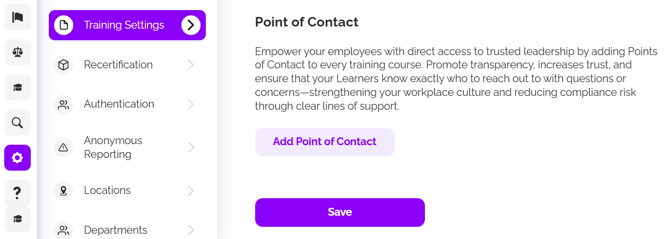
Step 2: Add a Point of Contact
- Click "Add a Point of Contact"
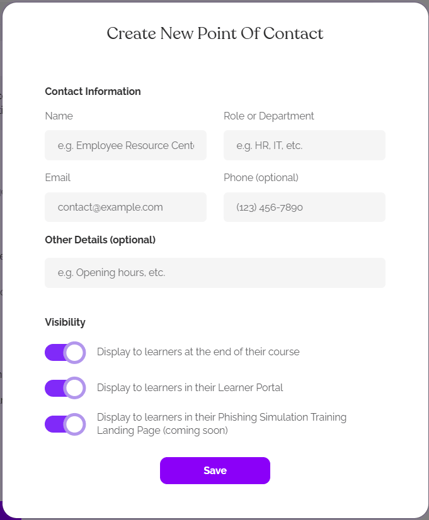
- Enter contact information:
- Name (can be an individual or department)
- Email address
- Phone number
- Role/Department
- Other details (availability, Slack handle, etc.)
Step 3: Configure Visibility Settings
Decide where the point of contact should be visible to learners by using the toggles for:
- Display at the end of courses
- Display in the learner portal
- Display in phishing simulation training
- Display as escalation contact in Email Reminders
- Use as the reply-to address in Email Reminders
Step 4: Save Your Settings
- Click "Save" to implement your point of contact
- The contact information will now be visible to learners in the selected locations
Managing Multiple Points of Contact
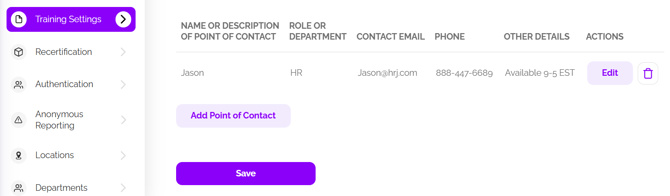
You can add multiple points of contact for different purposes:
- Create separate contacts for HR, IT, department heads, or other relevant roles
- Edit existing contacts by clicking the edit icon
- Delete contacts that are no longer needed by clicking the delete icon
Learner Experience
Once set up, learners will see the point of contact information in:
- Their learner portal under "Points of Contact"
- At the end of completed courses (if enabled)
- Future phishing simulation training (coming soon)
Benefits
For Administrators:
- Fulfills compliance requirements for California and Connecticut harassment prevention training
- Provides liability and risk mitigation through clear escalation pathways
- Improves organizational culture and employee satisfaction
- Offers standardized visibility across all training contexts
For Learners:
- Creates clarity on support and escalation paths
- Builds trust in organizational support systems
- Reduces confusion about who to contact for specific issues
- Enhances the overall learning experience
Best Practices
- Include availability information in the "Other details" section
- Create role-specific points of contact for larger organizations
- Regularly review and update contact information
- Consider adding alternative contact methods like Slack handles