![logolimanobkg-1.png]](https://help.easyllama.com/hs-fs/hubfs/logolimanobkg-1.png?height=40&name=logolimanobkg-1.png)
Before You Start
What You'll Need
- Admin access
- Training available within your organization
At a Glance
- Open Settings > Recertification
- Find the individual training you want to configure
- Set or update its recertification frequency
- Review previous changes in Recertification History
What to Know
- Recertification frequency is configured at the individual training level
- Each training can have its own custom frequency
- EasyLlama uses the training's configured frequency and each learner's completion date to determine their recurring training cycle
- A learner's recertification date occurs 30 days before their existing certification expires
- Changing a training's frequency can also be applied to learners who have already completed the training
- Changes to a training's frequency are recorded in Recertification History
Auto-Assign is managed separately from frequency and determines whether recurring training is assigned automatically or manually. See Turning Off Automatic Recertification to learn more.
Set a Training's Recertification Frequency
Step 1: Open Recertification Settings
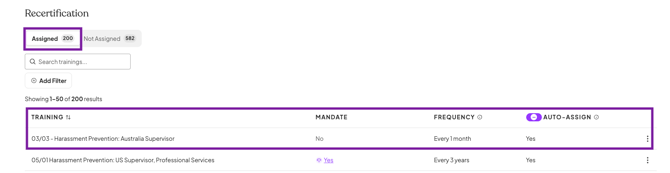
From your EasyLlama Admin dashboard, go to Settings > Recertification.
Trainings are organized into two views:
- Assigned shows trainings with recertifications currently configured
- Not Assigned shows trainings without a configured recertification
Use the search and filters to quickly find the training you want to manage.
Step 2: Set or update an individual training's recertification settings
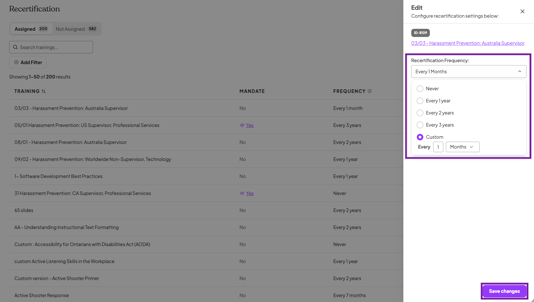
Find the individual training you want to configure, click the three-dot menu, and select Edit.

Under Recertification Frequency, select how often learners should recertify. Choose from the available preset frequencies or select Custom to set a specific number of months or years.
Because recertification frequency is configured at the individual training level, each training can follow its own recurring schedule based on your organization's needs.
Once you've selected the frequency, click Save changes.
When You Change an Existing Frequency
Changing the frequency for a training can also affect learners who have already completed it.
EasyLlama allows the updated frequency to be applied to existing learners. If the change is not applied retroactively, their currently scheduled recertification dates remain unchanged and the updated frequency applies to future recertification cycles.
Review Recertification History
Need to see how a training's settings have changed over time?
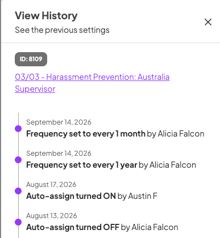
For an individual training, click the three-dot menu and select View History.

Recertification History shows:
- Previous frequency changes
- Auto-Assign changes
- Who made each change
- When each change was made
This gives you a clear record of how the training's recertification settings have changed over time.
Quick Questions
What’s the difference between recertification frequency and Auto-Assign?
Recertification frequency determines how often learners need to complete the training again. Auto-Assign determines how that recurring training gets assigned. With Auto-Assign enabled, EasyLlama automatically generates the recurring assignment based on the configured schedule. With Auto-Assign turned off, EasyLlama continues tracking the recertification, but an Admin must manually assign the training when it’s time for the learner to recertify.
What happens if I change a training’s recertification frequency?
When you change a training’s recertification frequency, EasyLlama gives you the option to apply the updated frequency to learners who have already completed the training. If you choose not to apply the change retroactively, their existing scheduled recertification dates remain unchanged and the updated frequency applies to future recertification cycles.
Are recertifications based on when training is assigned or completed?
Recertifications are based on the learner’s completion date. This ties the learner’s next certification cycle to when they actually completed the training rather than when it was originally assigned. Existing recertification dates that were scheduled using the previous assignment-date method are not recalculated retroactively.
When will a learner’s recurring training be assigned?
The recertification date is the date the learner’s recurring training is assigned. EasyLlama calculates this date based on the training’s configured frequency and schedules the assignment 30 days before the learner’s existing certification expires. For example, if a training has a 12-month recertification frequency, the recurring assignment is generated after 11 months, giving the learner 30 days to complete it before the existing certification expires.
What happens if a learner never completes their initial training?
A future recertification is only scheduled after the learner completes the training. If the learner never completes their initial assignment, no recertification date is scheduled. The original assignment remains active until it is completed or otherwise managed by an Admin.
What’s Next?
- Turning Off Automatic Recertification
- Manually Recertifying Learners
- Managing a Learner's Training Assignments
Llama Fact: Llamas have excellent long-term memories and can recognize routines for years. Even llamas appreciate a good recurring schedule! 🦙