![logolimanobkg-1.png]](https://help.easyllama.com/hs-fs/hubfs/logolimanobkg-1.png?height=40&name=logolimanobkg-1.png)
Before You Begin
What You'll Need
- Admin access
- Training assigned to at least one learner
- A recertification frequency configured for the training
At a Glance
- A learner completes their assigned training
- EasyLlama uses the learner's completion date and the training's configured recertification frequency to determine the next recertification cycle
- The learner's recurring training is assigned on their recertification date, which is 30 days before the existing training certification expires
- With Auto-Assign enabled, EasyLlama automatically delivers the recurring assignment
- When the learner completes the recurring training, the recertification cycle restarts
What to Know
- Recertifications are based on the learner's completion date, not the original assignment date
- The recertification date is the date the learner's recurring training is assigned, not the date they are expected to complete it
- Recurring training is assigned 30 days before the learner's existing certification expires
- Auto-Assign determines whether EasyLlama automatically automates delivers of the recurring assignment due for recertification or an Admin must assign it manually
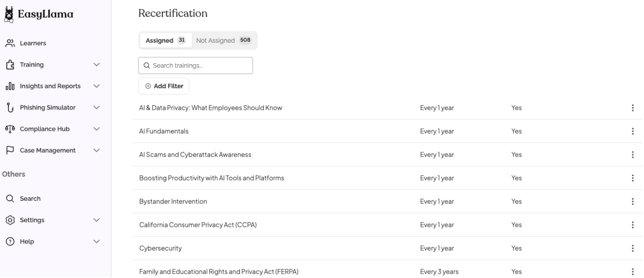
- Recertification frequency and Auto-Assign are configured for each training under Settings > Recertification.
⚠️ Trainings assigned through Classrooms or SCORM do not generate recertification
dates and cannot be used with Automatic Recertification.
How Automatic Recertification Works
Step 1: The learner completes their training
When a learner completes an assigned training, EasyLlama uses the completion date as the starting point for the learner's next recertification cycle.
The training's configured recertification frequency determines when that learner will need to complete the training again.
Step 2: EasyLlama calculates the learner's next recertification
EasyLlama uses the learner's completion date and the training's configured recertification frequency to calculate the next recertification cycle.
The learner's recertification date is set 30 days before their existing certification is scheduled to expire. This gives the learner 30 days to complete the recurring training before the existing certification expires.
For example, if a learner completes a training with a recertification frequency of every 12 months, their recurring training will be assigned after 11 months, giving them 30 days to complete it before the 12-month certification period ends.
Step 3: The recurring training is assigned
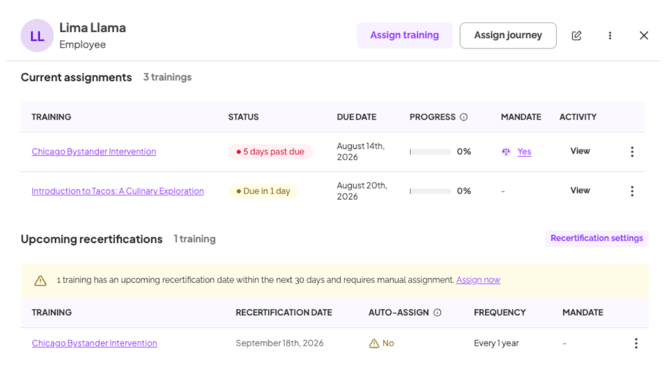
On the learner's recertification date, EasyLlama generates the recurring training assignment when Auto-Assign is enabled for that training.
The learner receives the standard training invitation through the organization's enabled notification channels and can begin the new assignment.
If Auto-Assign is turned off, EasyLlama continues tracking the recertification, but an Admin must manually assign the training.
Step 4: The learner completes their recertification
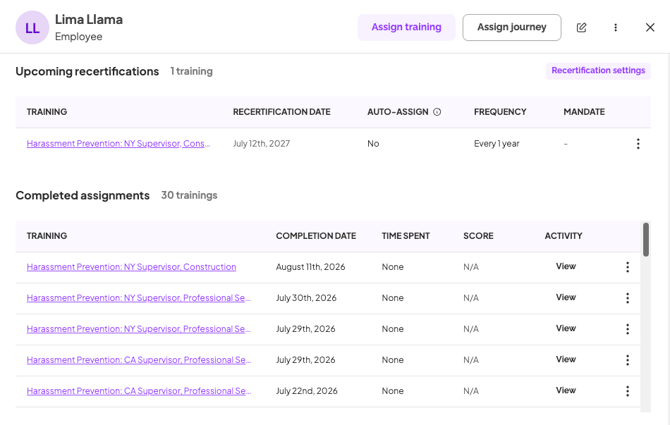
When the learner completes the recurring training, the assignment moves to Completed assignments in their learner profile.
Their recertification cycle then restarts based on the new completion date and the training's configured recertification frequency.
Automatic vs. Manual Recertifications
With Auto-Assign enabled, EasyLlama automatically generates the recurring training assignment on the learner's recertification date.
With Auto-Assign turned off, EasyLlama continues tracking when the learner is due for recertification, but an Admin must manually assign the recurring training.
Auto-Assign can be configured for individual trainings under Settings > Recertification.
To learn how to manage recurring training manually, see Turning Off Automatic Recertification.
Recertification Notifications
With Auto-Assign enabled, EasyLlama automatically generates the recurring training assignment on the learner's recertification date.
Admins can receive notifications to stay ahead of both automatic and manual recertifications.
For automatic recertifications, confirmed Admins with recertification emails enabled receive a weekly email when trainings are scheduled to be automatically assigned the following week. If the organization's seat balance is running low, the notification may also warn that this could prevent upcoming assignments from being generated.
For manual recertifications, confirmed Admins with recertification emails enabled receive a weekly email when learners are due for recertification in approximately the next 30 days so they know manual action is required.
If Slack is connected and recertification Slack alerts are enabled, the organization can also receive recertification notifications in Slack.
Once a recurring training assignment is successfully generated, the learner receives the standard training invitation through their enabled notification channels. Subsequent reminders follow the organization's existing reminder settings.
Quick Questions
Why are recertifications based on completion date instead of assignment date?
Recertifications are based on when the learner actually completes the required training rather than when it was originally assigned. This creates a more compliance-driven recertification cycle by tying the next certification period to the learner's actual training completion.
Will existing scheduled recertification dates change now that recertifications are based on completion date?
No. Existing learner recertification dates are not recalculated retroactively. Recertification dates that are already scheduled remain unchanged, and the completion-date logic applies to future recertification cycles.
What's the difference between a recertification date and a due date?
The recertification date is the date the learner's recurring training is assigned. The due date is when the learner is expected to complete that assignment. Recurring training is assigned 30 days before the learner's existing certification expires.
What happens if an automatic recertification can't be assigned because there aren't enough seats?
Admins may receive a low-balance warning before upcoming automatic recertifications are assigned. If the recurring assignment cannot be generated, the learner does not receive a training invitation because learner notifications are only sent after a successful assignment.
Does completing a recertification send the learner a new certificate by email?
No. Completing the training generates or regenerates the learner's certificate, but the certificate is not sent in a dedicated recertification email. The certificate remains available through the platform.
What’s Next?
- Setting a Training's Recertification Frequency
- Turning Off Automatic Recertification
- Manually Recertifying Learners
- Managing a Learner's Training Assignments
Llama Fact: Llamas are creatures of habit and thrive on consistent routines. Sounds like they’d be fans of Auto-Assign. 🦙