![logolimanobkg-1.png]](https://help.easyllama.com/hs-fs/hubfs/logolimanobkg-1.png?height=40&name=logolimanobkg-1.png)
Before changing integrations, please contact Support for assistance. It can have unintended consequences.
⚠️The user connecting this integration must have full admin access to Bamboo; employee-level users cannot retrieve the necessary data.
What You Need
- Full Admin Access to the BambooHR Account (Employee-Level users cannot retrieve the needed data)
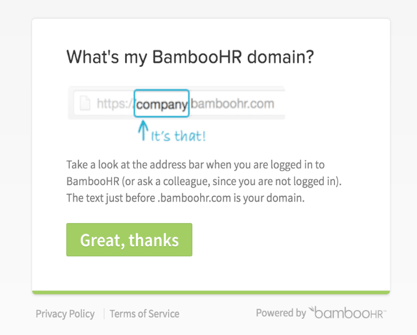
- The BambooHR subdomain (e.g., “companyname” from companyname.bamboohr.com)
- Administrative Access to the Dashboard
- Access to Settings > Integrations
Fields That Sync
NOTE: Name and Status are required fields, as well as one of the following, noted with a double asterisk (**).
- Employee #
- EEID
All other fields are optional. Required fields are noted with an asterisk (*).
| Bamboo | EasyLlama |
|---|---|
| Name (First, middle, and Last)* | Name (First, Middle, Last) |
| Preferred Name | Will not appear on the admin-facing dashboard, but will be used to address Learners in their dashboard and within courses. It will not be used for certificates of completion. |
| Job title | Title |
| Work email** | |
| First Available Phone [See Quick Questions Below] | Phone |
| Hire Date | Start Date - This will not populate on Learner records but can be seen on the learner data export. |
| Employment Status | Employment Type (Full-time, Part-time, Contractor, etc.) |
| Department / Division | Department |
| Address | City, State, Zip/Postal Code, and Country will be used to determine employee Region in EasyLlama. |
| Location | Location |
| Employee #** | Employee ID |
| Manager | Manager |
| Direct Reports | Subordinates |
| Role | Will be determined based on subordinates |
| Status* | Inactive, Active |
| EEID** | Bamboo Specific Integration User ID |
Method: Connect BambooHR to EasyLlama
Step 1: Initiate connection
Log in to your EasyLlama dashboard and go to Settings > Integrations > Bamboo. Click the Connect button.
Step 2: Enter your BambooHR subdomain
In the pop-up window, enter only your BambooHR subdomain name (the part before ".bamboohr.com") and click Save.
Step 3: Authenticate with BambooHR
If you’re not already logged in, you’ll be prompted to enter your BambooHR credentials. After successful authentication, you’ll be redirected back to EasyLlama.
Helpful Tip: The user connecting must have full BambooHR admin privileges. Employee-level users cannot retrieve the necessary data for this integration.
Post-Setup Configuration
Access integration settings
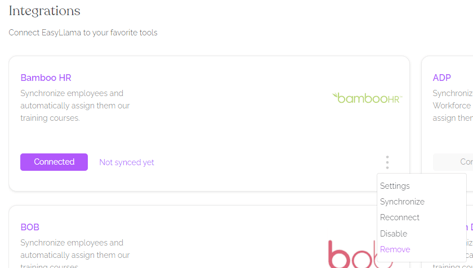
Click the three dots menu (⋮) on the BambooHR integration tile to:
- Synchronize: Trigger your first manual sync immediately
- Configure settings: Adjust field mappings and automation rules
- View sync status: Check when the last sync occurred
Helpful Tips
Do not use employee-level BambooHR access
Only users with full BambooHR admin privileges can establish this connection. Verify your access level before beginning setup.
Do not include the full BambooHR URL
Enter only your subdomain (e.g., "companyname"), not "companyname.bamboohr.com" or "https://companyname.bamboohr.com".
What's Next?
Quick Questions
How often does data sync?
Employee data syncs automatically every 24 hours. You can also trigger manual syncs at any time.
Is this a two-way sync?
No, this is a one-way integration from BambooHR to EasyLlama. Employee data flows into EasyLlama, but training progress doesn’t sync back to BambooHR.
What data gets synced?
Employee names, email addresses, departments, locations, and other HR fields you configure in the integration settings.
How does the Phone Field work?
The Work Phone field is prioritized. If no work phone is available, the Mobile Phone field is used. If you only want work, or mobile/personal numbers to sync, please reach out to support at Support@EasyLlama.com.
Llama Fact: Llamas have excellent memories and recognize herd members for years—just like this integration remembers and syncs your employee data daily!