![logolimanobkg-1.png]](https://help.easyllama.com/hs-fs/hubfs/logolimanobkg-1.png?height=40&name=logolimanobkg-1.png)
If you have an unexpected charge, it’s likely that your account had an annual renewal, a course or seat overage, or an automatic recertification that required additional payment.
Immediate Actions
- Check the billing dashboard for recent charges and seat usage
- Review automatic recertification settings (commonly causes unexpected charges)
- Email billing@easyllama.com with your account details if unclear or if your situation is not covered here.
Common Reasons & Solutions
1. The Annual Subscription has been renewed
EasyLlama is a subscription-based platform. You should know that:
- All accounts have automatic, annually renewing subscriptions unless you have a multi-year contract or have made explicit arrangements otherwise.
- We do not offer one-time or pay-as-you-go services.
- Subscriptions are renewed unless canceled 60 days prior to the renewal date.
To cancel:
- Log in to the Dashboard.
- Go to Settings > Billing
- Note the Renewal Date (must cancel 60+ days before this)
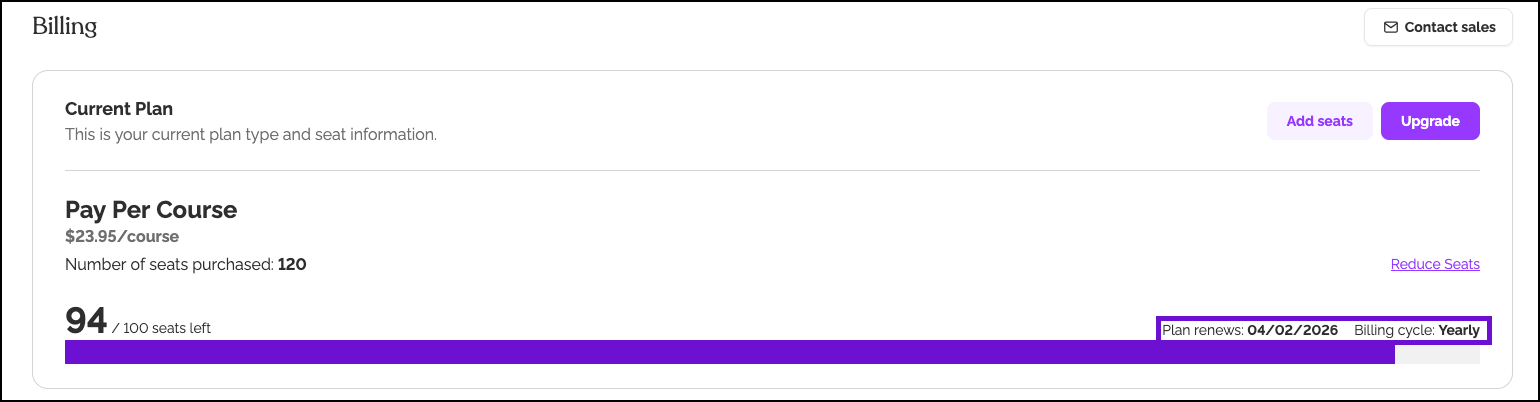
- Email billing@easyllama.com with cancellation request, including the reason and the date the cancellation should be effective
- Request confirmation receipt of cancellation
Relevant Articles:
- How Do I Cancel my EasyLlama Subscription?
- Where can I find my subscription details and seat balance?
2. There was a course or seat-use overage, and Post-Pay covered the upgrade
Post-Pay allows you to continue assigning training courses and adding learners when seats are exceeded, and it is automatically enabled for accounts with over 100 seats or courses. Overages are most commonly due to:
- Seat overages: Adding more learners or courses than your plan includes triggers Post-Pay charges.
- Automatic recertification: The system assigns renewal courses using additional seats.
Manage Post-Pay Overage Charges
Click here more information about post pay: What is Post-Pay, and how does it work?
Try this if: You were charged for extra courses or seats beyond the subscription
- Check Settings > Billing for Seats Used vs. Seats Purchased
- If you exceeded seats:
- Reduce active learners to match your subscription
- Or upgrade subscription to prevent future overages
- To disable automatic seat upgrades:
- Contact billing@easyllama.com to discuss fixed-seat options
- Monitor seat usage monthly to stay within limits
- Disable Auto purchase seats when over your seat limit using the slider
NOTE: Post-Pay upgrades happen automatically when the seat limit is exceeded.
3. There was an overage due to Automatic Recertification, and Post Pay covered the upgrade
Update Automatic Recertification Settings
If you are on the Pay Per Course subscription and automatic recertification is enabled by default, the system assigns and sends Recertification courses based on the Frequency settings. If there were not enough seats to cover the recertification training, Post-Pay covers the additional seats.
To disable automatic recertification settings:
- Go to Settings > Recertification Settings.
- In the top-right corner, slide the "Auto-assign trainings to learners on their recertification date” OFF.
- Changes will be saved automatically.
Relevant Articles:
- What is Post-Pay, and how does it work?
- Automatic Training Recertification Assignment
- Turning Off Automatic Recertification
How to Prevent Surprises
- Mark renewal dates in your calendar with 90-day advance reminder
- Monitor seat usage monthly in your billing dashboard
- Review recertification settings quarterly to ensure expected behavior
- Maintain accurate learner lists by removing departed employees promptly
When to Get Help
Contact billing@easyllama.com if:
- You canceled, but were still charged
- The charge amount doesn't match your rate agreement
- You need to dispute a charge
- You want to change from Post-Pay to fixed seating
What to tell billing:
- Account name and primary email
- Charge amount and date
- Screenshot of billing dashboard
- What you believe the issue is
Llama Fact: Llamas have a predictable annual shearing schedule—much like subscription renewals. Miss the timing, and you'll have a woolly situation!